Appearance
Chords and Scales
The Chord Track sits directly below the timeline ruler. Use it to sketch the global harmony of a song before or while writing MIDI.
Chord Track data is saved with the project and syncs in collaboration. Chords do not produce sound by themselves, but they act as the global harmony source for chord-tone fitting, Follow Chord Track playback/export, MIDI generation, and arrangement sketches.
Workflow page
For the shortest path from source MIDI to reviewed chords, generated MIDI, and safe regeneration, start with Analyze and Generate. For detailed Chord Track behavior, continue below.
Pick the Right Chord Workflow
Start with the musical source you have:
| You have... | Do this first | Then check |
|---|---|---|
| No chords yet | Add chords manually, use the diatonic palette, or add a progression. | Preview chords and adjust key/scale before generating MIDI. |
| A MIDI hook, pad, or imported file | Select the melodic MIDI region and click Create chords. | Review low-confidence chords before generating bass, arp, lead, or drums. |
| A chord range you trust | Select chord blocks, a marker section, or timeline regions, then generate. | The generation summary names the source range you intend. |
| A song outline | Add markers such as Intro, Verse, Chorus, Bridge, and Outro. | Section actions use chords from the selected marker to the next marker. |
| Generated MIDI after chord changes | Use Regenerate, Regenerate changed, or Regenerate section. | The generated region's source chip must be Chords, Changed, or Saved, not Missing. |
| A melody that should follow harmony | Enable Follow Chord Track on a melodic MIDI region. | Drum-kit regions are excluded because their notes trigger kit pieces, not pitches. |
| An audio loop with a clear chord | Use audio chord analysis as a sketch helper, then correct the Chord Track. | Treat the result as editable guidance, not automatic transcription. |
The safe order is: create or analyze chords, review/correct them, generate editable MIDI, then regenerate only when the source status says Miaou can rebuild the full range.
Find the Chord Track
Look above the track lanes:
- The left dock shows a Chords header and the current key/scale.
- The center timeline shows chord blocks below the ruler.
- The + button in the Chords header adds a chord at the playhead.
- Clicking a chord opens chord editing in the right Selection inspector.
Set Key and Scale
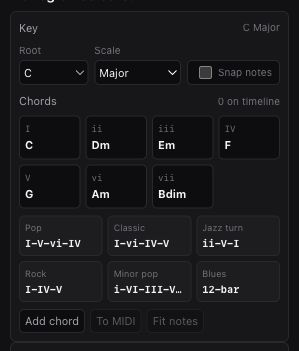
Select a chord, open Piano Roll, or open Selection with no region selected. The chord/key panel shows:
| Control | Result |
|---|---|
| Root | Sets the project key root, such as C, F#, or A. |
| Scale | Sets the project scale mode. |
| Snap notes | When enabled, newly drawn MIDI notes snap to the scale. |
Available scale modes:
- Major.
- Minor.
- Dorian.
- Mixolydian.
- Major pentatonic.
- Minor pentatonic.
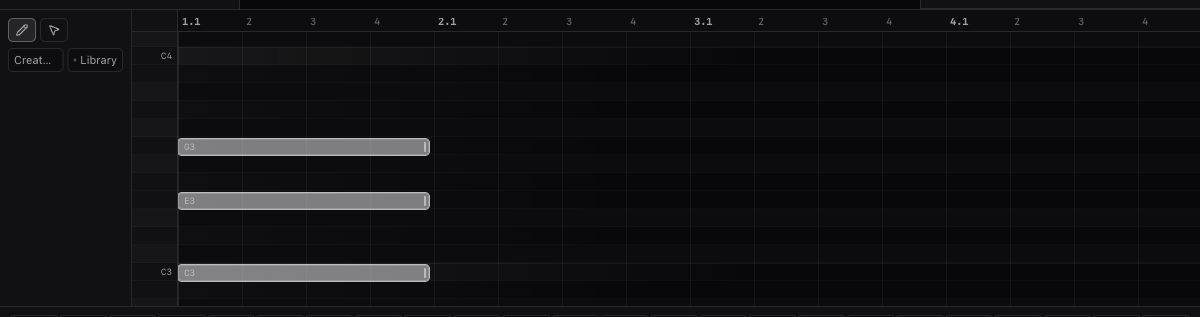
The piano roll highlights scale tones and the tonic so the grid is easier to read.
Add Chords
Use one of these:
- Click the + button in the Chords header to add a chord at the playhead.
- Click empty space in the chord lane to add a chord at that beat.
- Right-click the chord lane and choose Add chord here.
- Use the diatonic chord palette in the Selection inspector.
- Use the progression presets in the Selection inspector, or right-click the chord lane for placement-specific progression actions.
The palette uses the current key and scale, showing roman numerals and chord names. For example, in A Minor, the first palette chord is i Am.
Edit a Chord
Click a chord block. The Selection inspector shows:
| Field | Result |
|---|---|
| Symbol | Type common chord symbols such as Cm7, F#maj7, Bb/D, or Gsus4. |
| Root | Chord root note. |
| Type | Major, minor, diminished, augmented, sus2, or sus4. |
| Ext | None, 7, maj7, or 9. |
| Bass | Optional slash bass note. Root means no slash. |
| Inv | Chord inversion. |
| Start | Chord start in beats. |
| Beats | Chord duration in beats. |
For example, type C/E, or set Root to C and Bass to E, to create C/E. Bassline generation follows the slash bass, while chord-tone fitting still uses the full chord tones. Typing a slash-bass symbol or changing the slash-bass fields updates root, type, extension, slash bass, and the matching inversion when the bass note is a chord tone. Use Inv when you want a different chord-note order.
You can also drag a chord block in the lane to move it in time, or drag either edge handle to change its duration. When multiple chords are selected, dragging one selected chord or edge handle moves or trims the selected chord group together.
Use Cmd+C, Cmd+X, and Cmd+V to copy, cut, and paste the selected chord blocks at the playhead. Right-click the chord lane or a chord block and choose Paste chord here to paste at that clicked beat. Use Cmd+D for a quick duplicate, or hold Option / Alt while dragging a selected chord group to leave the originals in place and drop duplicates at the new beat. During Option/Alt-drag, the duplicates appear as ghost chords with + Copy badges.
Keyboard editing for selected chord blocks:
Enterfocuses the chord symbol field.TabandShift+Tabselect the next or previous chord block.ArrowLeftandArrowRightnudge selected chords by the active grid; addShiftfor a larger nudge.Cmd+ArrowUpandCmd+ArrowDownchange inversion for selected chords.Shift+Cmd+ArrowUpandShift+Cmd+ArrowDowntranspose selected chord roots.
Follow Chord Track
MIDI regions can follow the Chord Track during playback and export.
- Select a MIDI region.
- Open the Selection inspector.
- Enable Follow Chord Track.
When enabled, Miaou fits that region's played notes to the active chord tones at each note's timeline beat. The source MIDI notes are not rewritten, so turning the switch off returns the clip to its original pitches.
Drum-kit regions are excluded from Follow Chord Track because drum MIDI notes are kit-piece addresses, not melodic pitches.
Preview Chords
Use one of these:
- Double-click a chord block.
- Select a chord and click Preview in the inspector.
- Right-click a chord and choose Preview chord.
Preview plays the chord through the current audio engine. It does not create MIDI notes.
Build Progressions
The chord panel includes common progression presets:
- Pop: I-V-vi-IV.
- Classic: I-vi-IV-V.
- Jazz turn: ii-V-I.
- Rock: I-IV-V.
- Minor pop: i-VI-III-VII.
- Blues: 12-bar.
Progressions are inserted at the playhead, or after the selected chord if a chord is selected.
Use the preset buttons when you want a quick harmonic starting point, then edit the inserted chord blocks like any other Chord Track material.
Build an Arrangement
Click Build arrangement when you want an immediate editable sketch from the chord lane. Choose an arrangement style and variation first when you want a different deterministic result:
| Style | Layers |
|---|---|
| Song | Harmony, lead, rhythmic bass, arpeggio, kick, snare, and hat. |
| Dance | Pulse chords, lead, octave bass, arp, kick, snare, and hat. |
| Ambient | Held pad, soft pulse, and bass. |
| Cinematic | Strings pad, lead, ostinato, and low octaves. |
If the chord lane is empty, Miaou first adds a pop progression at the playhead. It then creates aligned MIDI parts:
| Part | Result |
|---|---|
| Chords | Block chords, held pads, or short pulse chords depending on style. |
| Lead | Editable top-line phrases based on chord tones. |
| Low end | Rhythmic root/fifth/octave bass or faster octave movement. |
| Motion | Repeating arpeggio or ostinato material depending on style. |
| Drums | Editable kick, snare, and closed-hat MIDI regions using built-in drum sounds. |
Miaou reuses an empty MIDI track when possible, creates the missing MIDI tracks, places the regions at the same chord start, opens the piano roll, and selects the generated material. Drum arrangement layers load a full drum kit and create one editable drum-lane MIDI region with kick, snare, hat, and section-dependent kit accents such as clap, open hat, toms, and cowbell. Everything remains normal MIDI: move notes, change instruments, add Track Effects, regenerate from chords, or undo the whole arrangement build.
Turn Chords into MIDI
Chords become audible arrangement material when converted to MIDI regions.
Use one of these:
- Select one or more chords and click Make MIDI, Arp, Pad, Bass, Drums, or Lead in the Selection inspector.
- Right-click a chord and choose a chord-to-MIDI action.
Conversion requires a MIDI track. If no MIDI track exists, add one first.
Conversion modes:
| Mode | Result |
|---|---|
| Make MIDI | Creates block chord notes. |
| Arp | Creates repeating arpeggio notes from each chord. |
| Pad | Creates held pad notes with smooth voice-leading. |
| Bass | Creates rhythmic bass notes from each chord. |
| Drums | Creates editable kit hits on an 808/909 Kit track. |
| Lead | Creates editable top-line phrases from chord tones. |
Choose a Voicing before generating chord or arpeggio MIDI:
| Voicing | Result |
|---|---|
| Close | Keeps each chord compact in one register. |
| Open | Raises alternating chord tones for a wider keyboard shape. |
| Spread | Adds the chord or slash-bass note below upper chord tones. |
Choose a Variation when you want the generated part to serve a different musical role:
| Variation | Result |
|---|---|
| Main | Creates the stable reusable part for the selected pattern. |
| Variation | Changes rhythm, note order, accents, or drum details while staying editable. |
| Fill | Creates denser movement that works for section endings and transitions. |
Use the generation controls when you want another deterministic part from the same chords:
| Control | What it changes |
|---|---|
| Density | Sparse removes rhythmic groups; Dense adds deterministic lower-velocity in-between notes. |
| Energy | Makes notes softer, balanced, or more accented without changing timing. |
| Rhythm | Keeps straight timing, nudges alternating groups, or moves on-the-beat groups toward offbeats. |
| Register | Places melodic, bass, and harmony parts one octave lower, in the normal range, or one octave higher. |
| Seed | Chooses another deterministic phrase. The same seed regenerates the same timing and accents. |
Drum patterns keep their kit-piece MIDI note mapping, so Kick, Snare, Hat, and full drum kits still trigger the expected named lanes.
For Make MIDI, Pad, and other held chord parts, Miaou keeps each generated stack close to the previous one when possible. That means chord changes may use inversions instead of jumping every note back to root position. The result is still ordinary MIDI: if you want a bigger jump, open the piano roll and move the notes.
Generated Bass parts add a short editable movement note before chord changes when the next chord has a clear bass target. Generated Lead parts add a short editable resolution note into the next chord, except in Fill variation where the phrase is already dense. These generated notes give chord progressions a stronger sense of direction while keeping every note visible and editable in the piano roll.
Choose the Generation Source
Miaou picks the chord source from the active selection:
| Active selection | Source used for generation |
|---|---|
| One or more chord blocks | The selected chord group. |
| One selected marker | Chords from that marker to the next marker, or to project end for the last marker. |
| Selected timeline regions | Chords that overlap the selected region range. |
| No chord, marker, or region | The full Chord Track lane. |
The Generate summary names the active source and shows the bar span for marker sections or selected ranges. Check that readout before building.
Make MIDI, Arp, Pad, Bass, Drums, and Lead create individual editable MIDI parts. Drums creates or reuses a kit-backed drum track. Build arrangement follows the same source rule, so you can select a verse, chorus, loop region, or marker section and generate editable MIDI only for that part of the song.
Use Markers as Sections
Markers let Miaou treat the Chord Track as song structure instead of one long loop.
For the full marker workflow, including marker editing, section duplication, fills, and section regeneration, see Markers and Sections.
- Add markers such as Intro, Verse, Pre-Chorus, Chorus, Bridge, Turnaround, or Outro.
- Select a marker in Markers or on the timeline.
- Run section-scoped actions from Markers or the marker context menu.
If you already have a chord lane but no section map, use Create markers. Miaou places a starter outline across the chord range, snaps suggestions to chord or bar starts, and skips marker positions that already exist.
| Chord-lane size | Suggested marker shape |
|---|---|
| Short | Compact Intro / Verse / Chorus or Intro / Verse / Chorus / Bridge / Outro map. |
| Medium | Adds Pre-Chorus when the chord range can support it. |
| Full song | Drafts repeated Verse 1 / Pre-Chorus 1 / Chorus 1 / Verse 2 style sections. |
The Markers panel shows the section role, bar range, chord count, generated MIDI count, changed source count, saved source count, and unresolved source count. That keeps longer generated arrangements navigable after chord edits.
Miaou infers section roles from marker names and adjusts Build arrangement:
| Marker role | Generation behavior |
|---|---|
| Intro / Outro | Sparser, lower-energy layers. |
| Verse | Avoids busy lead-motion layers. |
| Pre-Chorus | Builds with more syncopated motion. |
| Chorus | Uses denser, higher-energy generation. |
| Bridge | Uses alternate motion so the section feels different. |
| Turnaround / Fill | Prefers denser fill variation into the next section. |
Override the automatic section feel with Variation, Density, Energy, or Rhythm when needed. If a chord crosses a marker or selection boundary, Miaou clips the generated source to the requested beat range so the new MIDI starts and ends inside the section.
Marker section actions include:
| Action group | Commands |
|---|---|
| Generate layers | Make MIDI, Arp, Pad, Bass, Drums, Lead, and Build arrangement. |
| Add transitions | Build fill. |
| Refresh material | Regenerate section MIDI. |
| Create alternates | Create section takes. |
| Copy structure | Duplicate section, or Duplicate variation when you want fresh chord-generated MIDI takes. |
Duplicate or Vary a Section
Use Duplicate section when you want to copy a marker section as song structure, not just copy selected regions.
Miaou copies:
- the selected marker;
- the Chord Track blocks in that marker-to-next-marker range;
- overlapping timeline regions;
- MIDI clips for those regions.
The new marker is named like the next arrangement instance, such as Verse 2 or Chorus 3, instead of a clipboard-style copy label. Generated region/source labels follow that copied section identity.
Chord-generated MIDI in the copied section is retargeted to the copied chords, so Regenerate follows the duplicated progression instead of the original one. Use Duplicate variation when you want the same copied section structure but fresh alternate chord-generated MIDI takes for the copy. Manual MIDI and audio regions are still copied as-is.
Build a Song from Markers
Use Build song when you have several section markers and want the whole marker map generated at once.
Miaou walks each marker-to-next-marker section, applies the inferred section role, creates normal MIDI regions, and reuses the same generated layer tracks across the song instead of making new tracks for every section.
| Behavior | What happens |
|---|---|
| Section layers | Harmony, bass, drums, lead, pulse, arp, or pad layers follow each marker's inferred role. |
| Transition fill | Non-final sections can get a final-bar Fill region into the next marker. |
| Held material | Held harmony layers can continue through the section ending instead of forcing a short final-bar fill. |
| Fill controls | Fill regions default to dense, high-energy, syncopated generation unless you override Density/Energy/Rhythm. |
After editing chords inside a marker section, use Regenerate section in Markers or Regenerate section MIDI from the marker context menu. Miaou rebuilds generated MIDI regions that belong to that section from their saved source settings.
Use New section take or Create section takes when you want alternate generated takes for every generated MIDI region in the section without replacing the current arrangement.
Use Build fill when you want a transition into the next marker or section. With a marker section selected, it uses the final bar before the next marker and labels the generated material like Fill to Chorus so the saved source stays tied to that transition. Without a next marker, it uses the final bar of the current chord source. The generated layers switch to Fill and remain normal MIDI regions you can edit in the piano roll.
Generated notes are normal MIDI notes. After generation, use the piano roll to move, trim, quantize, humanize, strum, transpose, or edit velocity.
Regenerate Safely After Chord Edits
Chord-generated MIDI regions remember how they were made:
- generation mode, voicing, variation, seed, take number, density, energy, rhythm, and register;
- source beat range and generation scale;
- marker section label and role when the clip came from a section or fill;
- a saved copy of the source chords scoped to the selected range or marker section.
Timeline regions generated from chords show a source chip:
| Chip | Meaning | Regeneration behavior |
|---|---|---|
| Chords | The saved source still matches the current Chord Track. | Regenerates from current chords and saved settings. |
| Changed | Replacement Chord Track blocks fully cover the saved source range. | Regenerates from the edited Chord Track. |
| Saved | The saved range has no current chord material. | Regenerates from the saved chord copy. |
| Missing | Current chords cover only part of the source, or no usable current/snapshot source exists. | Regeneration is treated as unresolved instead of guessed. |
The Markers panel and marker context menu use the same source statuses for section rows. They count generated MIDI as changed, saved, or unresolved so you know whether a section can be rebuilt before you click.
In the MIDI clip inspector, expand From chords to see generation mode, seed, take, section, Regenerate, and New variation / New fill. The disclosure stays quiet when the source matches the current Chord Track and opens when the source is changed, saved-only, or missing.
Use Regenerate after editing the chord lane when you want one MIDI region rebuilt from the latest source chords and saved generation settings. Use Regenerate changed in the chord controls to rebuild every changed chord-generated MIDI region in one pass.
Regeneration uses the clip's saved generation scale and seed, so changing the project key later does not silently alter that clip's regenerated pattern. Miaou focuses the rebuilt MIDI in the piano roll for immediate review.
Create Chords from MIDI
Miaou can also go the other way: select a MIDI region and click Create chords in the Selection inspector, or right-click the MIDI region and choose Create chords from MIDI.
The analysis reads overlapping MIDI notes and shows a detected-chord summary before you apply it. Choose an Analysis grid first:
| Grid | Use it for |
|---|---|
| 1/2 bar | Faster harmonic rhythm or short chord changes. |
| 1 bar | Normal chord-per-bar material. |
| 2 bars | Slower harmony where chords hold for longer. |
Miaou uses the project key and scale as a light ranking hint when MIDI is ambiguous, but strong chromatic or borrowed chords can still win. Short pickup or passing notes at the edge of an analysis grid count less than notes that define the body of the segment.
Before writing chords, the MIDI inspector reports:
- how many chord blocks will be created;
- average confidence;
- whether any segments need review;
- how many silent or unclear segments will stay empty;
- candidate buttons for segments you may want to correct before writing to the Chord Track.
Low-confidence segments usually mean the MIDI contains passing tones, dense clusters, or melody notes that do not clearly state one chord. Fifth-only/power-chord dyads stay empty instead of being forced into a major, minor, or sus label. Two-note major/minor fragments can still be used when the defining third is present and the project scale can make the ambiguity reviewable.
Create chords is available for melodic MIDI regions. Drum-kit regions use MIDI notes as kit-piece addresses, so they are excluded from MIDI chord analysis.
Click Create chords to write the detected result into the Chord Track as normal editable chord blocks at the selected region's timeline position. Miaou selects the first analyzed chord that needs review, with lower-confidence segments first, so you can immediately correct or mark it reviewed.
Re-running the action replaces only the analyzed beat range. Longer existing chord blocks are trimmed or split so material before and after the analyzed range stays intact. Silent or unclear analyzed segments stay empty instead of preserving stale earlier chord guesses. Undo restores the previous chord lane.
Chords created from MIDI keep their analysis confidence, top alternate candidates, source MIDI region/grid, and analyzed beat range.
| Badge | Meaning |
|---|---|
| Review | Low confidence; check this before trusting generated parts. |
| Check | Medium confidence; usually usable but worth listening to. |
| Reviewed | You accepted or checked the chord. |
| Corrected | You chose one of Miaou's alternate candidates. |
| Manual | You typed a correction that was not an analyzer-scored choice. |
Use these review actions:
| Action | Result |
|---|---|
| Accept high-confidence | Marks clear matches reviewed so you can focus on Review and Check chords. |
| Previous review / Next review | Jumps through pending analyzed chords, starting with the lowest-confidence items. |
| Candidate button | Replaces the chord with that interpretation, including slash bass and matching inversion. |
| Manual chord edit | Stores the typed interpretation as a manual correction. |
| Mark reviewed | Approves the selected chord. |
| Reviewed + next | Approves the selected chord and jumps to the next pending review target. |
| Regenerate MIDI | Rebuilds dependent chord-generated MIDI from saved generation settings when references exist. |
You can correct any detected chord with the same root, quality, slash-bass, inversion, and trim controls used for hand-written chords. When analysis detects a slash-bass chord such as C/E, Miaou also stores the matching inversion when the bass note is a chord tone.
Create a Chord From Audio
Select a short tonal audio region and click Apply BPM + key + chord when waveform analysis finds confident hints you want to apply together. Miaou sets the project tempo and key when those estimates are available, then writes one editable Chord Track block over the selected audio region when the chord estimate is confident enough. The combined action is one project edit, so undo restores the previous tempo, key, and Chord Track state together. Use the individual Use BPM, Use key, and Create chord buttons when you want to apply only one hint.
For audio chord creation, Miaou analyzes the selected source slice, including the region's source offset. It then writes one editable Chord Track block over the selected audio region and selects that chord for review.
The created chord keeps:
- audio-analysis confidence;
- alternate candidates;
- source media, region, and track name;
- source slice or grid label;
- analyzed beat range.
The selected chord inspector shows whether the estimate came from the full region slice or from a one-bar audio-chord grid. If you apply tempo at the same time, the chord block is placed against the new project tempo map so the editable chord aligns with the updated bar grid.
Click Create audio chords when you want a bounded progression sketch instead of one block.
| Step | What Miaou does |
|---|---|
| Anchor | Treats the selected audio region start as the downbeat anchor. |
| Scan | Checks up to 16 bar-sized segments from that start. |
| Write | Creates editable Chord Track blocks only for segments above the audio chord confidence threshold. |
| Merge | Merges adjacent matching estimates into longer blocks. |
| Review | Stores the analyzed grid/span and selects the first analyzed chord needing review. |
| Re-run | Replaces the analyzed audio span, so skipped bars stay empty instead of preserving old guesses. |
This is useful for short loops or excerpts with one main chord per bar. It does not force a chord onto every bar.
Treat this as a sketch helper, not full audio transcription. It works best on short, sustained tonal material where one chord dominates the analyzed buffer. The estimator looks for common triads, diminished/augmented chords, sus chords, dominant sus chords, sevenths, major sevenths, diminished/augmented sevenths, ninths, and clear slash-bass inversions when a low chord tone is strong enough. Ninth labels require both the seventh and ninth tones, so add-nine material may appear as a simpler reviewable chord. Dense mixes, vocals, drums, distortion, long files that skip detailed analysis, or regions containing several chord changes may produce no estimate or a chord that needs manual correction.
If Miaou detects a possible chord below the apply threshold, the button shows Low confidence chord instead of creating a Chord Track block. Use a shorter or clearer tonal region, or add the chord manually when the estimate looks musically right.
Fit Existing MIDI Notes to the Scale
Use Fit notes in the chord/key panel when you want the selected notes, or the active MIDI clip, moved to the current scale.
If MIDI notes are selected, only those notes are moved. If no notes are selected, the active MIDI clip is fitted.
Open Piano Roll when you want chord-aware fitting. The MIDI ruler shows the chord lane over the selected region, and the Chords action moves selected notes, or the whole active clip, to the nearest tone in the chord under each note.
Context Menus
Right-click a chord block for:
- Preview chord.
- Make MIDI from chords.
- Create arpeggio from chords.
- Create pad from chords.
- Create bass from chords.
- Create drums from chords.
- Create lead from chords.
- Duplicate chord.
- Delete chord.
Right-click empty chord lane space for:
- Add chord here.
- Make MIDI from chords.
- Create arpeggio from chords.
- Create pad from chords.
- Create bass from chords.
- Create drums from chords.
- Create lead from chords.
- Build arrangement.
- Common progression presets.
Right-click a MIDI region for Create chords from MIDI. Right-click a chord-generated MIDI region for Regenerate MIDI from chords or New variation / New fill from that region's saved chord source.
Collaboration Behavior
Chord lane edits sync with collaborators as project edits. If another user changes the chord lane or key/scale, your local chord lane updates and playback reflects the latest project state.
Practical Limits
- Chord blocks do not produce full arrangement audio by themselves. Use preview for auditioning a selected chord, Follow Chord Track to fit melodic MIDI regions during playback/export, or chord-to-MIDI generation when you want editable notes.
- Chord blocks use beat positions. The top bar exposes one project BPM control; imported MIDI tempo maps are preserved and can drive imported clip timing, but Miaou does not include a manual tempo-map editor.
- Chord extensions are limited to none, 7, maj7, and 9.
- Slash bass is stored per chord and drives generated bass patterns. It does not create separate per-track chord-follow transforms.
- Snap-to-scale affects newly drawn MIDI notes and the explicit Fit notes action. It does not rewrite existing MIDI automatically.
Related Pages
- Analyze and Generate is the task-first path for MIDI-to-chord analysis, review, generation, and regeneration.
- MIDI Editor explains Piano Roll note editing, Follow Chord Track, Fit notes, and generated MIDI regions.
- Workflow Recipes gives a shorter chord-to-MIDI walkthrough.