Appearance
Projects and Storage
Miaou projects are opened with a project link and password instead of a user account. Keep both pieces together when you need to return to a project or invite someone else.

Workflow checklist
Before sending work to someone or exporting a ZIP, start with Save, Share, and Export. For storage and history behavior, continue below.
Safe Project Loop
Use this loop whenever the work needs to survive reload, sharing, collaboration, recording, or export:
| Step | What to do | Why it matters |
|---|---|---|
| Save | Turn a draft into a project with Save. | A saved project gets a link, password, media storage, History, Share, and Export. |
| Unlock | Enter the password when opening a saved link or history version. | Unlocking lets the browser restore media, save edits, collaborate, record, and export. |
| Verify | Press Space, check media restored, and confirm the latest arrangement before sharing/exporting. | You know the link or export reflects the musical state you expect. |
| Version | Use Save version or Cmd+S before risky edits, major generation, comping, or sending work. | History becomes a recovery path, not just a list of old timestamps. |
| Restore | Use Open, Restore this version, or Fork version depending on how much you want back. | You can inspect, roll back, or branch work without guessing what the current project was. |
If you only remember one rule: save the draft first, then create versions before work that would be hard to recreate.
Project Lifecycle
Most project questions come from mixing up drafts, saved projects, unlocked sessions, and history versions.
| State | What it means | What you can do |
|---|---|---|
| Clean draft | A new local session that has not been saved to a project link. | Sketch, import, record locally, then click Save before you rely on sharing or media restore. |
| Saved project | A project exists at a /p/... link with a title and password. | Reload it, share the link/password, export, collaborate, and save versions after unlocking. |
| Unlocked project session | Your browser has recently unlocked that project with its password. | Save edits, restore project media, export ZIPs, collaborate, record, and create versions. |
| History version | A read-only snapshot saved under History. | Open it for review, restore it into the live project, or fork it into a new editable project. |
| Export ZIP | A rendered download prepared from the unlocked saved project state. | Download the full mix, project data, source media, and stems when available. |
If you are not sure which state you are in, look at the top bar:
- Save means you are still in a draft.
- Share, Export, and History mean the project is saved and unlocked.
- An unlock form over the timeline means you opened a saved project but still need its password.
- A read-only history view means you are viewing a snapshot, not editing the live project.
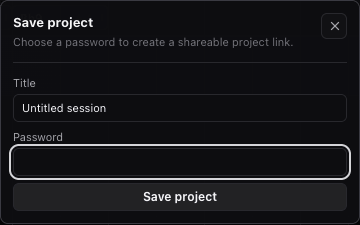
Save a Draft as a Project
- Click Save in the top bar.
- Fill Title.
- Fill Password.
- Click Save project.
The password must be at least 8 characters. Miaou creates a unique saved-project link such as /p/k541vGO6Dq.
Drafts show a visible Save action in the top bar. Locked shared links show the unlock form over the timeline. Saved projects show Share, Export, and History in the top bar after the project is unlocked.
Unlock a Project
- Open a shared
/p/...project link. - Fill Password in the unlock panel over the timeline.
- Click Open.
After unlock, the current browser can save, export, restore audio files, and collaborate for about 12 hours before you may need to enter the password again.
WARNING
Miaou cannot recover or change a lost project password. Keep the project link and password.
Save and Versions
Unlocked projects save the latest shared state so reloads and late joiners can recover current edits. Use Save version in History or press Cmd+S when you want an explicit recovery point.
The footer shows save, export, history, collaboration, and audio status messages such as Saving, Saved, Export ready, version counts, and live collaborator count. Treat these as project-state feedback; they are not separate controls.
Each explicit version stores a recovery snapshot of the project state. Versions include the chord lane, key/scale, MIDI clips, regions, markers, tracks, routing, instruments, effects, automation settings, and references to saved project media.
Use versions deliberately:
| Moment | Recommended action |
|---|---|
| Before sharing an important edit | Save version |
| Before deleting or replacing many regions | Save version |
| Before regenerating chord-based MIDI | Save version |
| Before loop comping or cleaning take slices | Save version |
| Before exporting a client or collaborator ZIP | Save version |
| After a small reversible edit | Normal live save is enough; use undo if needed. |
History
Click History in the top bar. Miaou opens a drawer that lists saved snapshots by timestamp.
Click Open beside an entry to open that snapshot in a new read-only tab. The same project password is still required. History tabs do not join collaboration and do not allow editing, recording, saving, importing, or exporting.
When a history tab is open, click Open project to return to the current live project. Click Restore this version when you want the live project to become the older version you are viewing. Miaou saves the current project first, so you can return to it from History.
Click Fork version when you want an editable copy without changing the live project. Miaou asks for a new project password, creates a new project link, copies the audio files referenced by that version, and opens the fork. Use this when you want to try an alternate direction or rescue useful material from an older version while collaborators keep working in the original project.
Restore, Fork, or Keep Working?
| Need | Use |
|---|---|
| Check what an older version sounded or looked like | Open the history version |
| Make the current live project become that older version | Restore this version |
| Start a separate editable copy from that older version | Fork version |
| Keep the live project but recover a few details manually | Open the version read-only in another tab and recreate/copy by hand where practical. |
Restoring changes the live project. Forking creates a new project link and keeps the original live project intact.
Project Link
Click Share in the top bar to copy the current project link. A collaborator still needs the project password to unlock it.
The link is not the backup
The project link gets someone to the project. A version gives you a recovery point. Save a version before sharing the project or before a collaborator starts major edits.
Project Media
Imported and recorded audio is saved to the project when the project is unlocked. Loop-recorded takes are saved as project media too, including takes that are not active on a comp slice.
The app stores media references with the project and restores the files after the project is unlocked. Miaou handles project media maintenance automatically.
What Is Not Stored
Some session-only state is not intended as persistent project content:
- Input monitoring is disabled when saved projects reopen.
- Temporary remote edit locks are not long-term project data.
- Browser audio playback state is rebuilt when the project opens.
- Unsaved draft-only sessions are not shareable project records until you click Save.
Storage Summary
| Data | User-facing control or behavior |
|---|---|
| Project title and password | Save, project title field, unlock form. |
| Latest project state | Automatic save while the project is unlocked. |
| Version history | History and Save version. |
| Imported and recorded audio | Save/unlock, import, recording, and media restore. |
| Loop-recorded take media | Recording, take lanes, comp selection, and export ZIP. |
| Export ZIP files | Export ZIP and Download ZIP. |
| Realtime collaboration | Shared project link, password, presence, and live edits. |
| Unlock session | Unlock form; lasts about 12 hours before password reentry. |
Related Pages
- Save, Share, and Export is the practical checklist before sending or exporting work.
- Collaboration explains shared editing, presence, temporary locks, and what syncs.
- Import and Export explains audio restore, ZIP contents, stems, and MIDI export.
- Troubleshooting covers unlock, missing audio, export, and collaboration problems.