Appearance
Commands and Shortcuts
Miaou supports visible controls, context menus, global shortcuts, MIDI note keyboard input, and Actions search.
For the task-first editing model behind these commands, see Editing Basics.
On macOS, use Cmd. On Windows/Linux, use Ctrl for the same edit commands unless the shortcut explicitly says Option / Alt.
Pick the Right Command Surface
Miaou exposes the same core actions through several surfaces. Choose the one that makes the target clearest.
| Surface | Best when... | Example |
|---|---|---|
| Visible controls | You want the safest path and can already see the relevant panel. | Click Save, Export, Mix, Instrument, Record, or Grid. |
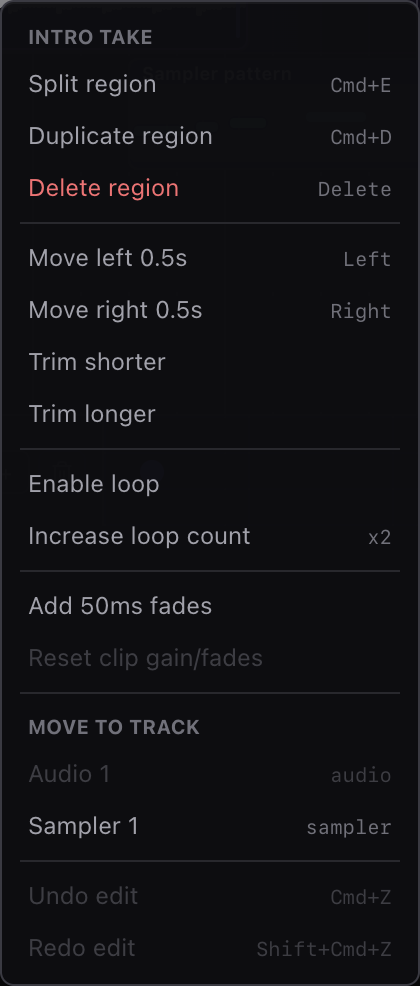
| Context menu | Placement matters or you want the command to target one object/lane. | Right-click a region to split at the clicked time or paste to that lane. |
| Keyboard shortcut | You already know the active editor and want speed. | Cmd+D duplicates selected notes, regions, chords, markers, or points. |
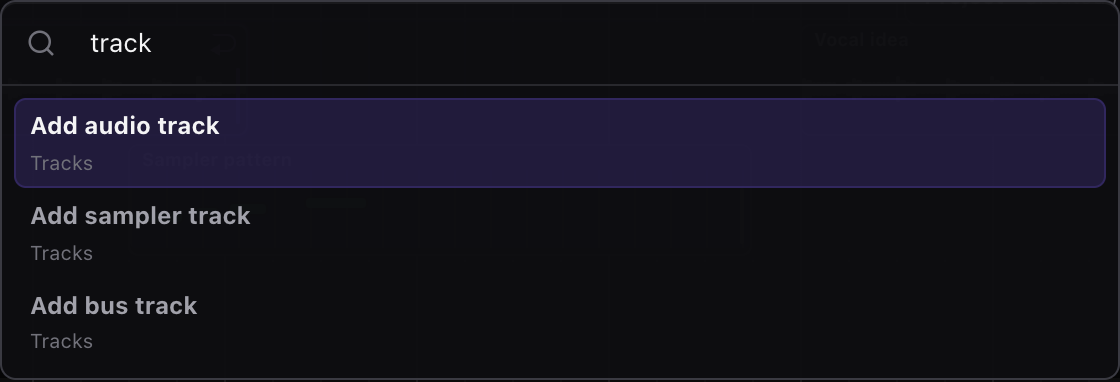
| Actions search | You know the action name and the active target is already clear. | Cmd+K, type Quantize, then press Enter after selecting MIDI notes. |
| Computer keyboard | You want to perform MIDI notes or drum hits without a controller. | Open Keyboard, select a MIDI target, then play the mapped keys. |
If a command feels risky, click the intended object first or use its context menu. Context menus are usually the clearest way to avoid stale selection or wrong-track mistakes.
When Not to Use a Shortcut
Shortcuts are fastest after the target is obvious. Use a visible control or context menu instead when the command needs a precise place or could change a lot of music.
| Situation | Better choice |
|---|---|
| You need paste to land on one exact lane | Right-click that lane or item and choose the paste-here action. |
| You are splitting at a clicked position | Right-click the region and choose Split here. |
| You are loading an instrument | Open Instrument and read the Load into target before clicking the instrument row. |
| You are changing routing or effects | Open Inspector > Mix or Inspector > Master and check the channel name first. |
| You are recording | Read the transport target chip before pressing Record. |
| You are about to delete a mixed selection | Click the intended editor surface first, then confirm the selected count or target label. |
| You are typing a value or symbol | Finish the field with Enter, discard with Escape, or click outside before app shortcuts. |
Learn These First
You do not need to memorize every shortcut. Start with the commands that make the whole app faster:
| Shortcut | Use it for | Safety check |
|---|---|---|
Space | Play or stop. | Does not fire while typing in a field or dialog. |
Cmd+S / Ctrl+S | Save a draft or create a recovery version. | Invalid focused fields must be fixed or discarded first. |
Cmd+Z / Ctrl+Z | Undo the last edit. | Use it immediately when the wrong target changed. |
Cmd+A / Ctrl+A | Select all in the active editor. | Click timeline, Piano Roll, Chord Track, markers, or automation first. |
Cmd+D / Ctrl+D | Duplicate the active selection. | Confirm the duplicate preview or selected duplicate afterward. |
Delete / Backspace | Delete the active selection. | Click the intended editor first when regions and notes are both selected. |
Cmd+K / Ctrl+K | Open Actions and search for a command. | Prefer visible controls or context menus when exact placement matters. |
| Context menu | Run a command exactly where you clicked. | Best for paste-here, split-here, add-point-here, and track actions. |
Before using a destructive shortcut, use the same three-step loop:
- Click the surface you mean to edit.
- Check the selected object count or target label.
- Press the shortcut once, then use undo if the wrong object changed.
Practice the Core Shortcuts
Use a small saved project or a throwaway draft and practice the same command on two surfaces. This teaches Miaou's active-editor model faster than memorizing the whole reference.
| Practice step | Do this | What to notice |
|---|---|---|
| Timeline selection | Click one region, press Cmd+A, then press Escape. | The timeline becomes the shortcut target and selects/clears timeline regions. |
| MIDI note selection | Open Piano Roll, marquee a few notes, press Cmd+A, then Escape. | The Piano Roll becomes the shortcut target and selects/clears notes. |
| Copy and paste placement | Copy one region, move the playhead, then paste. | The paste uses the playhead and compatible track unless you use a context menu. |
| Context-menu placement | Right-click a lane or grid position and choose paste there. | The clicked place wins over the general active editor. |
| Duplicate then undo | Select a region or notes, press Cmd+D, then Cmd+Z. | Duplicate creates normal editable material and undo removes that one edit. |
| Delete target check | Select a region, then select notes, then press Delete only once. | Delete follows the last editor surface you clicked or dragged in. |
If any step surprises you, stop and undo once. Then click the intended surface again before repeating the command.
Shortcut Cheat Sheet
Use this when you know the surface you are editing and want the fastest command.
| Context | Select all | Copy / cut / paste | Duplicate | Delete | Move / nudge |
|---|---|---|---|---|---|
| Timeline regions | Cmd+A | Cmd+C / Cmd+X / Cmd+V | Cmd+D or Option drag | Delete / Backspace | Arrows by Grid; up/down moves between compatible tracks. |
| MIDI notes | Cmd+A | Cmd+C / Cmd+X / Cmd+V | Cmd+D or Option drag | Delete / Backspace | Left/right by Grid; up/down transposes; Cmd+Up/Down octave. |
| Chord blocks | Cmd+A | Cmd+C / Cmd+X / Cmd+V | Cmd+D or Option drag | Delete / Backspace | Left/right by Grid; Cmd+Up/Down inversion; Enter edits symbol. |
| Markers | Cmd+A | Cmd+C / Cmd+X / Cmd+V | Cmd+D or Option drag | Delete / Backspace | Left/right by Grid; Shift uses a larger step. |
| Automation points | Cmd+A | Cmd+C / Cmd+X / Cmd+V | Cmd+D or Option drag | Delete / Backspace | Left/right changes time; up/down changes value. |
| Track headers | Track regions | Paste copied regions only | Cmd+D duplicates track | Use context menu | Option+Up/Down reorders non-master tracks. |
| Text fields and dialogs | Browser-native | Browser-native | Browser-native | Browser-native | App shortcuts stay disabled while typing. |
Active context
Shortcuts follow the editor you last clicked or dragged in. If a MIDI region is selected but you just marquee-selected notes in the Piano Roll, Delete acts on notes. If you click the region again, Delete acts on regions.
Context Switch Examples
Use these examples when Miaou shows more than one selection and you are not sure which command target is active:
| What you just did | Cmd+A / Delete / duplicate act on... | To switch target deliberately |
|---|---|---|
| Clicked a MIDI region in the timeline | Timeline regions. | Marquee or click notes in the Piano Roll to make notes active. |
| Marquee-selected MIDI notes after selecting the region | MIDI notes in the selected clip. | Click the region, empty timeline, or another region to edit clips. |
| Clicked a chord block or chord lane | Chord Track blocks. | Click the timeline or Piano Roll before using region/note commands. |
| Clicked a marker pin or marker row | Markers. | Click a region, chord, note, or automation lane to leave markers. |
| Clicked an automation lane or point | Automation points in that lane. | Click the timeline or Mix/Master target before editing something else. |
| Clicked a track header | Track actions and regions on that track. | Click a region in the lane for normal region editing. |
| Typed in BPM, clip gain, a chord symbol, or a dialog | The text field uses normal browser editing. | Press Enter to commit, Escape to discard, or click outside. |
| Opened a context menu on a lane or item | The context-menu command uses the clicked position. | Close the menu if you want shortcuts to use the active editor. |
Actions Search
Press Cmd+K to open Actions search. Use it for keyboard-first command search; visible controls, panels, and context menus remain the clearest path for placement-sensitive edits.
Actions search uses the same active target rules as shortcuts unless the command opens a visible picker or dialog. For exact placement, use the visible control or right-click the place where the edit should happen.
Navigation:
| Shortcut | Action |
|---|---|
ArrowDown | Move to next enabled command. |
ArrowUp | Move to previous enabled command. |
Home | Move to first enabled command. |
End | Move to last enabled command. |
Enter | Run selected command. |
Escape | Close palette. |
Useful searches:
| Group | Common commands | Safer visible/context path |
|---|---|---|
| Project | Save project, Save version, Share, Export ZIP, open History. | Top bar project controls. |
| Transport | Play/stop, set/toggle/clear the transport loop range, or set the loop range to selection/project. | Top transport controls and timeline ruler. |
| Edit | Select all, copy, cut, paste, duplicate, delete, split, undo, redo, grid and snap choices. | Shortcuts, footer Grid/Snap controls, item context menus. |
| Timeline | Import audio, slice audio at transients, Set downbeat, use detected tempo/key. | Timeline drop target, region context menu, Selection inspector. |
| MIDI | Create MIDI, import MIDI, export MIDI, quantize, humanize, strum, transpose, fit notes to scale or chords. | Bottom Piano Roll, Keyboard, and MIDI Tools modes; note/grid context menus. |
| Chords | Add progressions, create chords from MIDI, review analyzed chords, generate/regenerate MIDI from chords. | Chord Track, Selection inspector, Chords panel, chord lane/region context menus. |
| Markers | Add marker, create markers, duplicate section, duplicate variation, build song/fill from markers. | Marker lane and marker context menus. |
| Tracks | Add tracks, duplicate track, move track, show Track Effects, add common Track Effects. | Track header context menu, Inspector > Mix, and Track Effects controls. |
| Effects | Show effects, add Parametric EQ, Compressor, Delay, Reverb, and other Track Effects. | Inspector > Mix and Inspector > Master panels. |
| Automation | Show/hide automation lanes, target an effect parameter, edit points where automation is active. | Parameter A buttons, automation lane context menus, and bottom Automation controls. |
Use Actions when the command target is already obvious. Use visible controls or context menus when the command needs a location: import here, paste here, split here, add point here, load into this track, or export this saved project.
Global Shortcuts
| Shortcut | Action |
|---|---|
Cmd+K | Open Actions search. |
Cmd+S | Save the draft as a project, or create a recovery version when the project is already unlocked. |
Space | Play/stop transport. |
Cmd+Z | Undo last edit. |
Shift+Cmd+Z | Redo last edit. |
Cmd+A | Select all in the active context: MIDI notes, chord blocks, markers, automation points, timeline regions, or regions on the selected track header. |
Cmd+C | Copy selected regions, MIDI notes, chord blocks, markers, or automation points. |
Cmd+X | Cut selected regions, MIDI notes, chord blocks, markers, or automation points. |
Cmd+V | Paste copied material at the playhead, or paste copied regions onto the focused track header. |
Cmd+D | Duplicate the active selection: regions, sections, chord blocks, markers, automation points, MIDI notes, or the focused track header. |
Cmd+E | Split selected region or selected regions at the playhead. |
Cmd+L | Set the transport loop range to the active selection, or to the project when nothing is selected. |
Option / Alt drag | Duplicate a dragged region, chord block, marker, MIDI note, or automation point selection with a ghost copy preview. |
Delete / Backspace | Delete selected region, chord blocks, markers, MIDI note, or automation points by context. |
Escape | Clear the active selection or close an open app menu/palette. |
+ / - | Zoom timeline in or out. |
F | Fit the project in the timeline viewport. |
ArrowLeft / ArrowRight | Nudge selected item by the active grid. |
Shift+ArrowLeft/Right | Nudge selected item by a larger grid step. |
ArrowUp / ArrowDown | Move selected regions by track, transpose selected MIDI notes, or change selected automation values. |
Cmd+ArrowUp/Down | Transpose selected melodic MIDI notes by octave, or change selected chord inversion. |
Shift+Cmd+ArrowUp/Down | Transpose the selected chord root. |
[ / ] | Shorten or lengthen selected MIDI notes by the active grid in the Piano Roll. |
Option+ArrowUp/Down | Move the selected non-master track up or down. |
Shift+Option+ArrowUp/Down | Move the selected non-master track to the top or bottom. |
Enter | Edit the selected chord symbol when a chord block is selected. |
Tab / Shift+Tab | Select the next or previous chord block when a chord block is selected. |
Editing and playback shortcuts are ignored when focus is inside text inputs, number inputs, selects, textareas, contenteditable fields, dialogs, menus, and pad panels. Space still plays/stops after clicking normal app chrome buttons such as transport, track, or effect controls.
Cmd+S is intentionally available from most app states. In a draft, it opens the Save dialog. In an unlocked project, it creates a recovery version. If a valid focused field such as BPM, Source BPM, clip gain, a MIDI note value, a chord value, a sampler envelope value, or a track name has an uncommitted edit, Miaou commits that field before saving. If the focused field contains an invalid value, save is blocked so you can fix the number instead of silently storing the wrong project state.
Numeric inspector fields such as BPM, Source BPM, clip gain, fades, chord timing, MIDI note values, and sampler envelope values behave like normal text fields. Click into the field to select the current value, type a replacement or partial value, then press Enter or leave the field to commit it. Press Escape to discard the edit.
Edit commands follow the last editor you used, not whichever button still has browser focus. If you click or drag in the timeline, Cmd+A, copy, paste, duplicate, Delete, Escape, and arrow nudges act on regions. If you then select notes in the Piano Roll, the same commands act on notes. Chord blocks, markers, and automation points work the same way. Track headers intentionally support only a smaller set of commands: Cmd+A selects the regions on that track and switches editing back to regions, Cmd+V can paste copied regions onto that track, Cmd+D duplicates the selected track, and track move shortcuts reorder it. Copy, cut, and Delete do not act as track-level clipboard commands, so they will not remove a track by accident.
Hold arrow-key nudges or MIDI note-length brackets when you want repeated small edits; transport toggles and command actions do not repeat while held.
If a Shortcut Surprises You
Use these quick checks when a shortcut does not affect the object you expected:
| Symptom | Likely cause | Fix |
|---|---|---|
| Delete affected notes instead of a selected region | The Piano Roll was the active editor. | Click the region or empty timeline, then press Delete again. |
| Delete affected a region instead of notes | The timeline was the active editor. | Click or marquee the notes in the Piano Roll first. |
| Paste landed on the wrong track | The active destination was the selected track or playhead. | Right-click the target lane/grid and choose a paste-here action. |
Cmd+S did not save | A focused numeric/project field contains an invalid draft value. | Fix the field, press Enter, or press Escape to discard the draft, then save. |
Space typed a space instead of playing | Focus is inside a text field, dialog, note, comment, or symbol edit. | Leave the field or press Escape, then press Space. |
| Computer keyboard did not play notes | A text field has focus, or no MIDI track/region is the active target. | Select the intended MIDI region or track, then open Keyboard if needed. |
[ / ] changed note length instead of octave | MIDI notes are selected. | Clear note selection before using the keys for computer-keyboard octave movement. |
Computer Keyboard as Piano
When focus is not in a text field, the computer keyboard can play the current instrument:
| Row | Keys |
|---|---|
| Lower octave | Z S X D C V G B H N J M |
| Upper octave | Q 2 W 3 E R 5 T 6 Y 7 U |
The Piano Roll shows the same map with note labels and pressed-key feedback. Use [ and ] or the octave buttons to move the map down or up when no MIDI notes are selected for length editing.
The octave range is bounded to practical MIDI notes, so octave buttons disable when the keyboard map reaches the supported low or high range.
The selected MIDI region or MIDI track determines which instrument the computer keyboard plays. For melodic instruments, Chromatic mode is a two-row piano layout and Chord mode maps the same keys to the current Chord Track chord tones at the playhead. For drum kits, the map becomes a kit-piece pad layout with labels from the loaded drum map, such as Kick, Snare, Closed Hat, Open Hat, Clap, Tom, Ride, and Crash.
Drum Pads
Drum pads support pointer input and keyboard focus:
- Press/click to trigger.
SpaceorEntertriggers a focused pad.- Release or blur stops the pad.
Context Menus
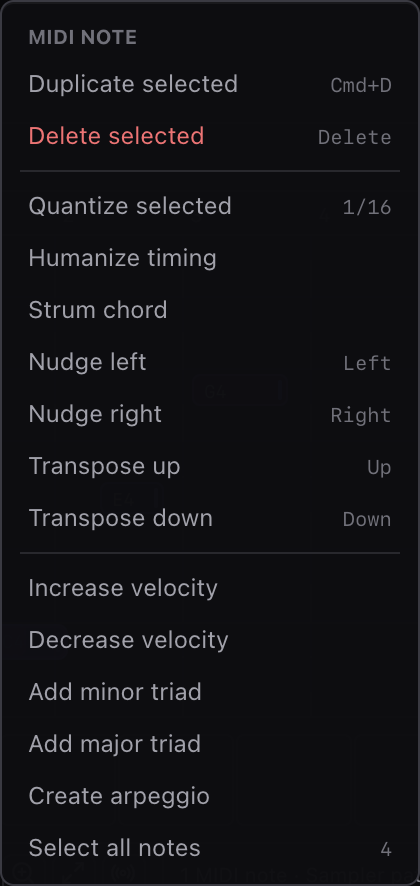
Right-click to discover available actions. Context menus are often the fastest way to find commands for the item under the pointer.
Important context menus:
- Chord block.
- Chord lane.
- Region.
- Track.
- MIDI note.
- MIDI grid.
- Track Effect or Master Effects automation lane.
- Automation point.
- Marker.
- Timeline ruler.
- Empty timeline.
Related Pages
- Editing Basics explains the active editor, clipboard, duplicate, nudge, trim, split, loop, and undo.
- MIDI Editor covers note-specific shortcuts, computer keyboard input, drum lanes, and MIDI actions.
- Workspace Tour explains where commands, context menus, panels, and status feedback live in the app.