Appearance
Feature Index
Search by feature name when you want the right manual page.

How to Use This Index
Confirm whether a control, command, or workflow is available in Miaou, then open the linked guide for the full workflow.
| If you are trying to... | Start with |
|---|---|
| Learn Miaou from zero | Quick Start, then DAW Basics. |
| Set up browser audio, recording input, or MIDI | Browser and Device Setup. |
| Edit regions, notes, chords, markers, or points | Editing Basics and Commands and Shortcuts. |
| Import, trim, tempo-fit, or slice audio | Audio Regions and Tempo and Follow Project Tempo. |
| Write MIDI, drums, or computer-keyboard parts | MIDI Editor and Drum Kits and Beatmaking. |
| Analyze chords or generate editable MIDI | Analyze and Generate, Chords and Scales, and Markers and Sections. |
| Record, loop record, or choose takes | Recording and Takes and Comping. |
| Mix, route, automate, or understand exports | Mix and Automate, Signal Flow and Export Paths, and Effect Reference. |
| Save, share, collaborate, or recover work | Save, Share, and Export, Projects and Storage, and Collaboration. |
| Diagnose a symptom | Troubleshooting. |
If a feature appears here but the workflow is unclear, follow the linked guide page first. If you cannot find a feature here or in the guide pages, start from the closest documented workflow or use Actions search.
What Counts as a Feature Here
Feature entries cover visible app controls, documented commands, shortcuts, and behavior preserved by save/load/export.
| If you need... | Use this index for... |
|---|---|
| A quick yes/no check | Search this page for the feature name or related term. |
| The actual workflow | Open the linked guide page and follow its task steps. |
| Quality boundaries or browser caveats | Use Practical Limits. |
| A plain-language definition | Use the Glossary. |
| A symptom such as silence or bad export | Use Troubleshooting before changing music. |
Feature Group Map
| Group | Includes |
|---|---|
| Project | Drafts, saved projects, versions, history, project links, status, and project actions. |
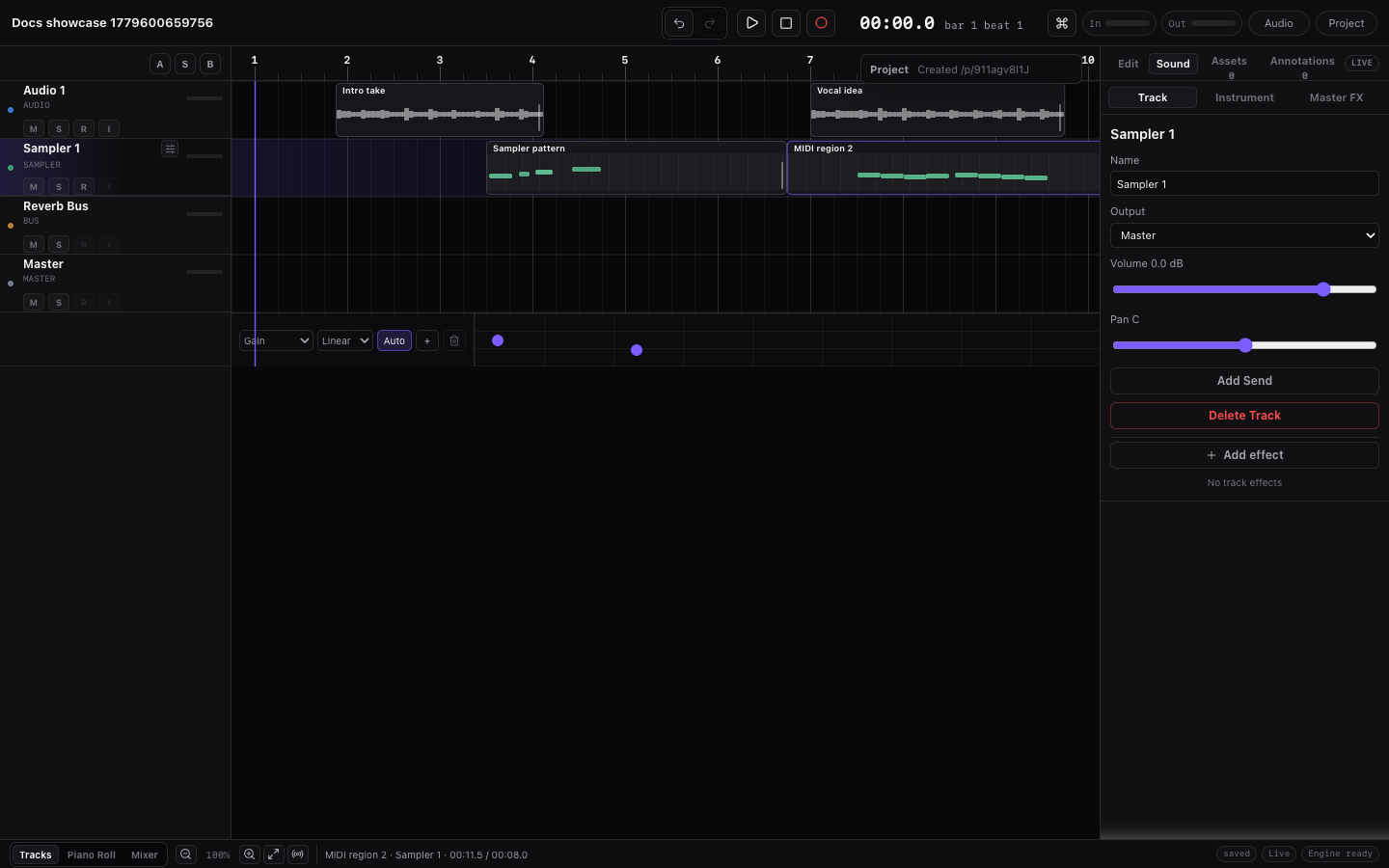
| Timeline | Ruler, playhead, regions, trim, loop, audio analysis, markers, and automation rows. |
| Tracks and Routing | Track types, headers, reorder, duplicate, mute/solo, monitoring, meters, sends, and output routing. |
| Recording | Audio/MIDI record target, count-in, metronome, loop takes, comp choices, and meters. |
| MIDI | Piano Roll, drum lanes, computer keyboard, Web MIDI, import/export, chords, and generation. |
| Instruments | Instrument panel, previews, sampler controls, custom samples, kits, and persistence. |
| Effects | Master Effects, Track Effects, effect types, sidechain, tempo sync, limiter, and compact visuals. |
| Automation | Track Effect and Master Effects lanes, points, interpolation, copy/paste, nudge, and mute. |
| Import and Export | Audio/MIDI import, tempo policies, project media restore, ZIP export, mix, stems, and MIDI export. |
| Collaboration | Shared projects, edit sync, uploaded media sync, presence, remote playheads, and locks. |
| Navigation | Context menus, Actions search, bottom modes, footer controls, right dock, and undo/redo. |
Project
- Clean silent draft.
- Empty audio/MIDI tracks, an empty Reverb Bus routing track, Master track, and empty Chord Track on first open.
- Local unsaved draft state.
- Save project.
- Unlock project.
- Save version.
- History.
- Top-bar Save, Share, Export, and History controls.
- Actions search opened with
Cmd+K. - Save dialog with title and password validation.
- Unlock panel over locked projects.
- Project title editing.
- Project password validation.
- Open read-only history version.
- Restore history version.
- Fork history version as a new editable project.
- Copy project link.
- Export ZIP.
- Export, save, sync, history, selection, and MIDI status messages in stable status surfaces.
- 12-hour unlocked browser session.
- Password-protected project link access.
- Project media restore after unlock.
- Saved project structure for tracks, regions, clips, media references, chords, markers, automation, effects, routing, transport loop, takes, and versions.
Timeline
- Playhead.
- Time/bars ruler.
- Ruler context menu.
- Transport loop range/brace for repeated playback.
- Stable top-bar BPM text editing with blur/Enter commit and explicit stepper nudges.
- Horizontal timeline scrolling.
- Arrangement overview/minimap.
- Follow playhead.
- Fit timeline.
- Zoom in/out.
- Footer Grid control with Off, Bar, Beat, straight, and triplet values.
- Absolute and relative snap mode.
- Region selection.
- Multi-region marquee selection.
- Edge auto-scroll while marquee selecting.
- Region dragging in time.
- Drag and keyboard region moving between compatible tracks.
- Single-region and multi-region right-edge trimming.
- Region splitting.
- Audio transient slicing.
- Audio Set downbeat from the playhead for non-destructive source-start correction.
- Region duplication.
- Region deletion.
- Region loop handle.
- Audio fades.
- Clip gain.
- Exact clip gain and fade value fields with stable text editing.
- Audio Follow project tempo.
- Audio Source BPM region control.
- Detected, half-time, and double-time Source BPM choices for analyzed audio.
- Stable Source BPM text editing with blur/Enter commit.
- Audio Stretch mode choices: Default, Beats, Tones, and Tape.
- Audio tempo marker controls: add at playhead, detect from transients, edit beat/source fields, drag marker ticks, quantize detected hits to grid, extract groove, clear, and remove.
- Dedicated Audio Regions guide for audio-region trim, fades, clip gain, tempo tools, transient slicing, custom sampling, media restore, and export checks.
- Tempo-following audio Trim Start keeps marker anchors coherent with the new region start.
- Selected audio regions show detected transient ticks as passive timing guides.
- Dedicated Tempo and Follow Project Tempo guide.
- Takes.
- Waveform drawing.
- Waveform transient analysis.
- Audio tempo estimation from transients.
- Audio key estimation from tonal waveform analysis.
- One-chord audio-to-Chord-Track sketching for short tonal regions.
- MIDI region note preview.
- Markers.
- Single, toggle, range, and select-all marker selection.
- Marker drag, Option-drag duplicate preview, copy/cut/paste, duplicate, nudge, and delete for selected markers.
- Dedicated Markers and Sections guide for marker editing, section actions, duplicate section, fills, and section regeneration.
- Remote playheads.
- Automation lane.
Tracks and Routing
- Audio tracks.
- MIDI tracks.
- Bus tracks.
- Master track.
- Add audio/MIDI/bus track.
- Duplicate non-master tracks with or without regions.
- Delete non-master tracks.
- Rename tracks.
- Drag, context-menu, and keyboard track reordering with Master fixed at the bottom.
- Track-head volume faders.
- Track-head pan/balance controls.
- Master output mute, volume, and balance.
- Master solo hidden.
- Mute.
- Solo.
- Bus solo auditions soloed bus returns.
- Record arm.
- Input monitoring.
- Track meters.
- Output routing.
- Sends to bus tracks.
Recording
- Single input recording.
- Audio/MIDI recording target preflight.
- MIDI-only recording into selected or newly created MIDI regions.
- Mono and stereo project audio support.
- Record arm.
- Count-in.
- Metronome.
- Live playhead during recording.
- Live recording region drawing.
- Recording processing state.
- Recording takes.
- Transport-loop audio recording that creates separate takes per pass.
- Compact take lane rename, mute, remove, and active Comp selection.
- Active take selection in the Selection inspector.
- Simple split-region comping with per-slice active take choices.
- Undo/redo, save/load, and export support for active take choices.
- Input, track, and master meters.
MIDI
- Web MIDI connection.
- MIDI input list.
- Computer keyboard note input.
- Computer keyboard octave controls.
- On-screen computer keyboard map with pressed-note feedback.
- Chord-aware computer-keyboard mode for melodic MIDI tracks.
- Instrument-aware melodic keyboard and drum-pad keyboard layouts.
- Dedicated Drum Kits and Beatmaking guide for named lanes, pads, paint-drag hits, imported drum MIDI, kit choices, and transition FX.
- Instrument keyboard.
- Project key/scale controls.
- Scale-aware piano roll highlighting.
- Snap-to-scale note drawing.
- Fit notes to scale.
- Chord guide in the piano-roll ruler.
- Fit notes to chord tones.
- Per-MIDI-region Follow Chord Track playback/export transform.
- Chord lane.
- Add chord at playhead.
- Add chord at lane position.
- Single, toggle, range, and select-all chord block selection.
- Chord block group move, Option-drag duplicate preview, and two-edge trim.
- Direct chord-symbol editing.
- Chord preview.
- Slash-bass chord labels and bass generation.
- Diatonic chord palette.
- Progression presets.
- Chord clipboard, duplicate, nudge, and delete for selected chord blocks.
- Chord-to-MIDI generation, including block chords, pads, arpeggios, basslines, drum parts, and lead phrases.
- Chord pad generation.
- Chord arpeggio generation.
- Chord bass generation.
- Chord drum generation on kit-backed drum tracks.
- Close, open, and spread chord MIDI voicing choices.
- Main, Variation, and Fill chord MIDI generation choices.
- MIDI-to-chord-lane analysis.
- MIDI chord-analysis source region/grid details.
- Audio chord estimate to editable Chord Track block.
- Audio chord-analysis source media/region details.
- Analysis confidence and review badges on MIDI-created chords.
- Previous/next analyzed-chord review navigation.
- Build arrangement from chord lane.
- Marker-scoped chord generation for sections.
- Regenerate generated MIDI for a selected marker section.
- New generated MIDI takes for a selected marker section.
- Final-bar Build fill generation for transitions.
- Section-aware chord-generated MIDI source details.
- Arrangement styles for Song, Dance, Ambient, and Cinematic sketches.
- Editable kit-backed drum arrangement layer with Kick, Snare, and Hat notes.
- Chord-generated MIDI source disclosure.
- Regenerate MIDI from source chords.
- New variation/fill from a chord-generated MIDI source.
- Regenerate generated MIDI regions that depend on a selected chord.
- MIDI region creation.
- Standard MIDI File import.
- MIDI import tempo policy: Keep project tempo, Use file tempo, and Original timing.
- Imported MIDI tempo-map policy documentation.
- Standard MIDI File export.
- Piano roll.
- Draw tool.
- Drum-lane paint-drag for repeated drum hits.
- Drum-kit lane view with named kit-piece rows.
- Drum pad mapping for loaded kit instruments.
- Select tool.
- Note selection.
- Note moving.
- Note trimming.
- Note deletion.
- Note duplication.
- In-note velocity handles.
- Multi-note relative velocity editing.
- Selection inspector note controls.
- Quantize with Grid, Amount, and Swing, including Beat and triplet grid values.
- Humanize.
- Humanize groove command.
- Apply extracted audio groove to MIDI notes.
- Strum.
- Triad generation.
- Seventh-chord generation.
- Arpeggio generation.
- Chord-tone fitting.
- Scale fitting.
- Transpose.
- Nudge.
- MIDI controller and performance data preservation, including sustain and attack controller events.
- MIDI program change, pitch bend, pressure, key signature, tempo, time-signature, and text event preservation.
- Imported MIDI tempo-map playback/render timing.
- General MIDI program and instrument-name mapping to nearest built-in instruments on import.
- General MIDI drum-kit import into one kit-backed track with named drum lanes.
Instruments
- Built-in instrument catalog.
- Instrument search.
- Instrument family filter.
- Instrument preview.
- Instrument loading.
- Custom imported sample loading.
- Custom sample root note.
- Custom sample gain.
- Fine tune.
- Sample start/end.
- ADSR envelope.
- Flexible region loop duration with partial final repeats.
- Reverse.
- Drum pads.
- Built-in instrument persistence in project versions.
- Drum-kit maps for named lanes, pads, and exact-kit-piece preview.
Effects
- Detailed effect manual: Effect Reference.
- Master output chain.
- Master output final mute, volume, and balance after Master Effects.
- Master Meter peak, RMS, stereo-correlation, momentary/short-term/integrated LUFS-style loudness, and spectrum analyzer display.
- Master Utility gain, width, balance, mono, phase invert, and left/right swap.
- Master Parametric EQ with four bands, band type, frequency, gain, Q, and analyzer overlay.
- Master Dynamic EQ with frequency, Q, threshold, ratio, range, attack/release, and mix.
- Master De-esser frequency, threshold, amount, release, and mix.
- Master Amp / Cab drive, tone stack, cabinet, mix, and output trim.
- Master Pedal Overdrive/Distortion/Fuzz modes with drive, tone, bias, mix, and output.
- Master Shifter frequency/ring modes with frequency, spread, drive, and mix.
- Master Resonator Harmonic/Chord/Metal modes with frequency, decay, tone, width, and mix.
- Master Vocoder with synth/noise/hybrid carrier, bands, formant, tone, release, mix, and output.
- Master Reverb Room/Hall/Plate style, pre-delay, decay, damping, and width.
- Master limiter/maximizer input drive, ceiling, soft knee, and release.
- Track Effects for audio/MIDI tracks.
- Ordered serial Track Effect chains.
- Duplicate Track Effects of the same type.
- Track Effect bypass without losing settings or automation identity.
- Meter.
- Utility.
- Parametric EQ.
- EQ.
- Gate.
- Transient shaper.
- Compressor.
- Compressor sidechain source for ducking.
- Silent sidechain key tracks routed to None.
- Multiband Dynamics with low/mid/high compression.
- De-esser.
- Dynamic EQ.
- Saturation.
- Amp / Cab.
- Pedal.
- Clipper.
- Bitcrusher.
- Shifter.
- Resonator.
- Vocoder.
- Chorus.
- Flanger.
- Phaser.
- Tremolo.
- Auto-pan.
- Auto-filter.
- Tempo-synced chorus, flanger, phaser, tremolo, auto-pan, and auto-filter divisions.
- Delay.
- Tempo-synced delay divisions.
- Reverb style, pre-delay, decay, damping, width, and mix.
- Room/convolution reverb.
- Pitch shifter.
- Limiter/maximizer.
- Compact effect visuals.
Automation
- Contextual Track Effect and Master Effects automation lane.
- Add automation point.
- Multi-select automation points.
- Drag selected automation point groups.
- Option-drag automation point duplicate preview.
- Copy/cut/paste automation points.
- Duplicate automation points.
- Nudge automation point timing by the active grid.
- Nudge automation point values.
- Delete automation points.
- Enable/disable automation.
- Linear interpolation.
- Stepped interpolation.
- Track effect parameter automation.
- Master effect parameter automation.
Import and Export
- Audio import.
- Audio import tempo policy: Keep original, Follow project tempo, and Set project tempo from sample.
- Audio import start policy: Keep file start and Trim to first hit.
- MIDI file import.
- MIDI import tempo policy: Keep project tempo, Use file tempo, and Original timing.
- MIDI file export.
- Audio placement.
- Drag audio to timeline.
- Use selected audio regions as custom samples.
- Slice selected audio regions at detected transients.
- Set project tempo from detected audio-region tempo.
- Time-stretch tempo-following audio regions in realtime preview and export.
- Set project key from detected audio-region key.
- Project audio restore.
- Export ZIP creation.
- Full mix WAV.
- Per-track stem WAVs when project size allows.
- Project data and referenced source media in export ZIP.
- Download ZIP.
Collaboration
- Live shared-project connection.
- Live collaborative project session.
- Project data sync.
- Uploaded recording/import media sync.
- Fine-grained edit sync.
- Remote presence.
- Remote playheads.
- Temporary locks for active edits.
- Recording/renaming/editing lock awareness.
Navigation
- Context menus for object-specific commands.
- Actions search for keyboard command lookup.
- Keyboard navigation in Actions search.
- Bottom bar mode selector.
- Footer grid/snap controls.
- Footer follow-playhead and fit-timeline controls.
- Right dock surfaces: Inspector, Instrument, and Markers.
- Inspector tabs: Selection, Mix, Master, and Instrument.
- Global undo/redo.
Related Pages
- Manual Home organizes features by user workflow.
- Practical Limits explains browser and workflow boundaries behind the feature list.
- Workspace Tour shows where the main feature groups live in the app.