Appearance
Glossary
When an app or manual term is unfamiliar, check the definition here. The definitions describe how each term is used in Miaou.
For a shorter first-read explanation, start with DAW Basics. For complete feature coverage, use the Feature Index.
How to Use the Glossary
If a term is confusing during a task, first decide which kind of object you are editing:
| Object type | Words you will usually see |
|---|---|
| Timeline | Track, region, clip, chord block, marker, playhead, grid, snap, split, loop, Trim Start. |
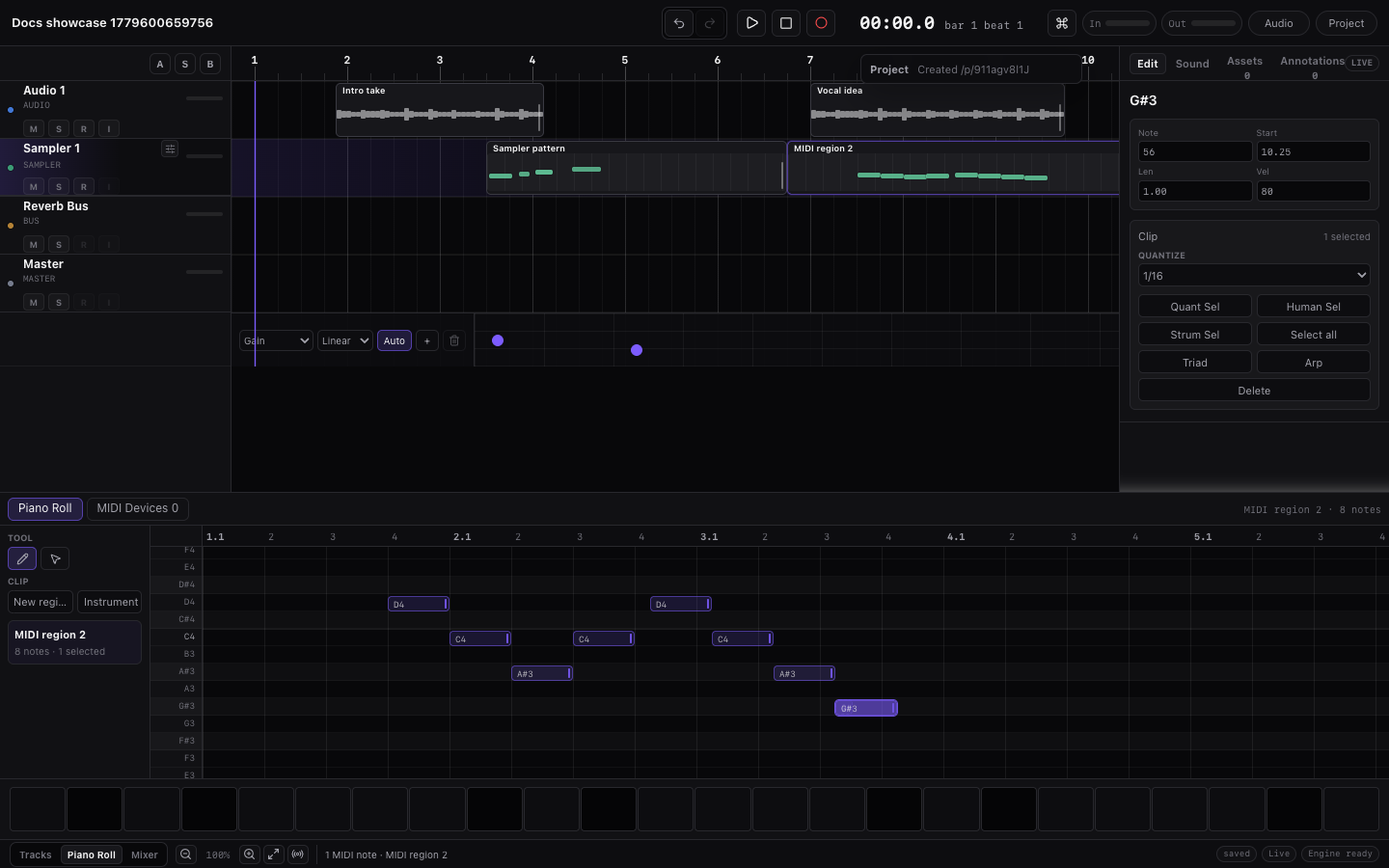
| MIDI editor | MIDI region, MIDI clip, note, velocity, Piano Roll, drum lanes, computer keyboard. |
| Audio region | Source BPM, Follow project tempo, stretch mode, fades, clip gain, tempo markers, media. |
| Mix path | Effect, send, bus, routing, Track Effects, Master Effects, sidechain, meter, full mix. |
| Project | Draft, project link, password, version, History, collaboration, export ZIP, stems, unlock. |
| Export ZIP | Download ZIP, project-mix.wav, project.json, media/, stems/, full mix. |
Then use the linked guide when you need the workflow, not only the definition.
Commonly Confused Pairs
| Pair | Difference in practice |
|---|---|
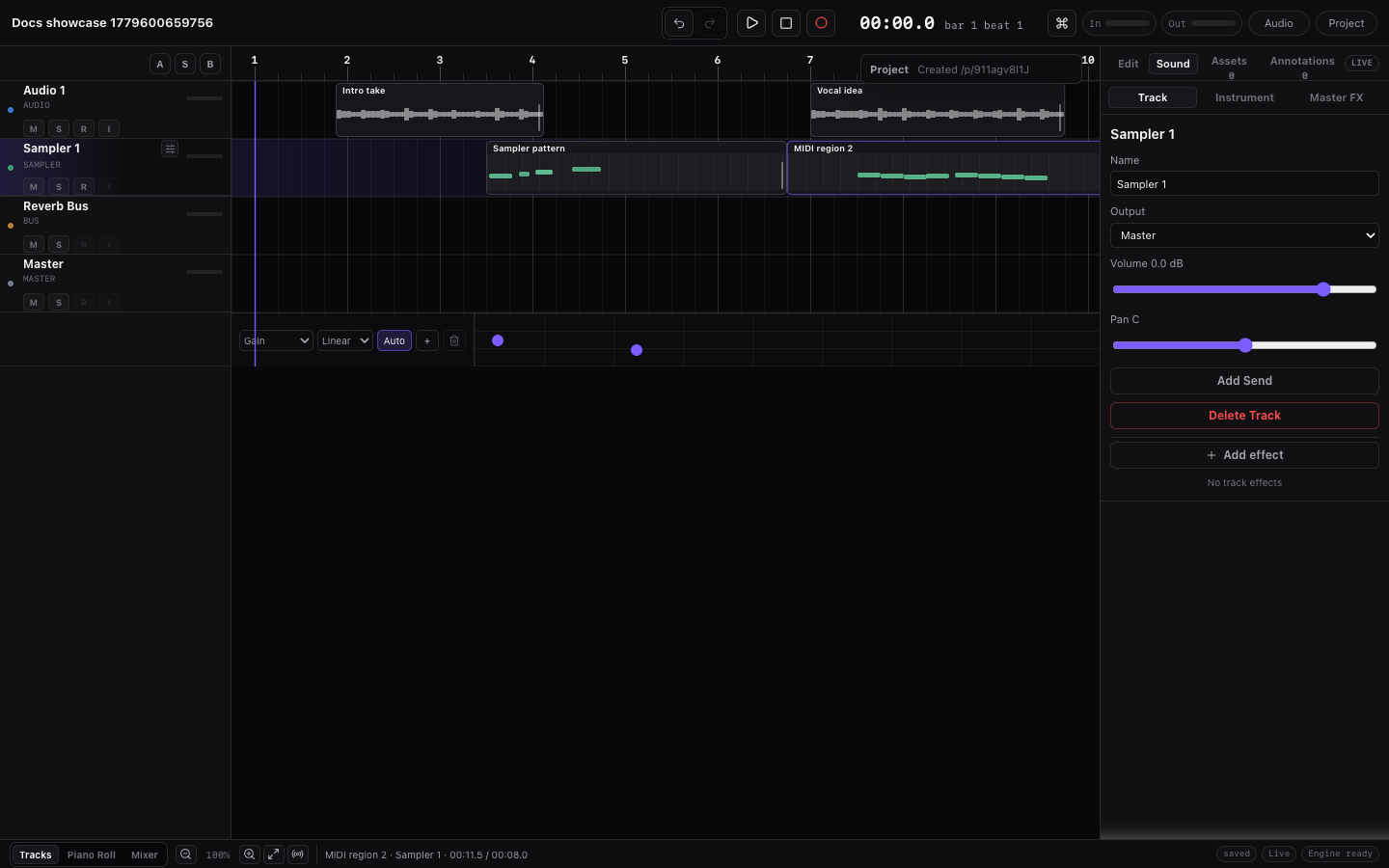
| Track vs region | A track is the horizontal lane and sound path. A region is the block on that lane that plays audio or MIDI at a time. |
| Region vs clip | A region is the timeline placement. A MIDI clip is the underlying note data used by a MIDI region. |
| Audio vs MIDI | Audio is recorded/imported sound. MIDI is notes and controls that need an instrument or drum kit to make sound. |
| Project BPM vs Source BPM | Project BPM drives the song grid. Source BPM is the original tempo of one imported audio region. |
| Follow project tempo vs BPM change | Changing BPM moves MIDI/grid timing. Imported audio stretches only when that region has Follow project tempo enabled. |
| Built-in instrument vs custom sample | A built-in instrument comes from Miaou's sound catalog. A custom sample uses one imported or recorded audio region as the MIDI sound source. |
| Generated MIDI vs manual MIDI | Generated MIDI starts from chords or sections, but it becomes normal editable MIDI. Manual edits stay until you choose to regenerate. |
| Transport loop vs region loop | Transport loop repeats playback over a range. Region loop repeats one region's source or MIDI clip for a longer visible duration. |
| Track Effects vs Master Effects | Track Effects process one source track before routing. Master Effects process the final summed mix. |
| Full mix vs stems | The full mix includes the final Master path. Stems are separate source-track exports and do not include final Master Effects/output controls. |
| Save vs Save version vs Export | Save makes the project link reopenable. Save version creates a recovery point. Export creates files for listening, sharing, or another DAW. |
| Marker vs comment | A marker names a time or section in the song. A comment is a project note attached to the work, not a separate arrangement object. |
Workspace Surfaces
| Term | Meaning in Miaou | Learn more |
|---|---|---|
| Actions search | The Cmd+K command search. Use it when you know the action name; use context menus when placement matters. | Commands and Shortcuts |
| Bottom editor | The lower editor area for Piano Roll, Keyboard, MIDI Tools, Audio, Automation, and timeline utility controls. | Workspace Tour |
| Instrument | The right-dock surface for searching, previewing, loading, and adjusting instruments or drum kits on the selected MIDI track. | Instruments |
| Inspector | The right-dock detail surface for the selected target: Selection, Mix, Master, and Instrument controls. | Workspace Tour |
| Markers | The right-dock surface for markers, section labels, short marker reminders, and marker-section actions. | Markers and Sections |
| Status bar | The bottom utility/status area for grid, snap, zoom, selection count, recent edit feedback, save/collab/export, and audio state. | Workspace Tour |
| Top transport bar | The top row for project title/state, undo/redo, play/stop, record, tempo, metronome, count-in, input meter, save, share, export, and History. | Workspace Tour |
| Right dock | The right-side panel that contains Inspector, Instrument, and Markers surfaces. | Workspace Tour |
Editing and Arrangement
| Term | Meaning in Miaou | Learn more |
|---|---|---|
| Active editor | The surface that receives edit shortcuts: timeline regions, Piano Roll notes, chord blocks, markers, automation, or track headers. | Editing Basics |
| Automation | Time-based movement of a Track Effect or Master Effects parameter. Static faders, pans, sends, mute, and solo save as mix controls. | Automation Lanes |
| Bar | A musical measure. Bars depend on the project tempo and time signature data. | Timeline Editing |
| Beat | A musical time unit inside a bar. Miaou uses beat positions for chords, MIDI, regions, markers, and generation. | DAW Basics |
| Chord block | A block in the Chord Track that stores chord root, quality, extension, bass, inversion, start, and duration. | Chords and Scales |
| Clip | The underlying MIDI note data used by a MIDI region. Duplicated MIDI regions get independent clip IDs. | Editing Basics |
| Comment | A note attached to the project or timeline context for communication or reminders. It is not a separate playable arrangement object. | Markers and Sections |
| Comp | A chosen combination of recorded take slices. In Miaou, comping is done by splitting a loop-recorded audio region and choosing takes per slice. | Takes and Comping |
| Context menu | The right-click menu for the object or surface under the pointer. It often includes paste-here, duplicate, trim, split, or delete. | Editing Basics |
| Analysis confidence | The review signal Miaou stores on analyzed Chord Track blocks to show whether a detected chord needs checking. | Analyze and Generate |
| Generated MIDI | MIDI regions created from Chord Track blocks, marker sections, or generation controls. They are ordinary editable MIDI regions. | Analyze and Generate |
| Grid | The musical spacing used for drawing, nudging, trimming, duplicating, and snapping. | Editing Basics |
| Marker | A timeline label for song structure, notes, navigation, or marker-section generation. | Markers and Sections |
| Playhead | The vertical time cursor that shows where playback starts or what time position an edit refers to. | Timeline Editing |
| Region | A block on the timeline. Audio regions point to audio media; MIDI regions point to MIDI clips. | Audio Regions |
| Region loop | A region setting that repeats the region's source or clip content until the visible region ends. | Editing Basics |
| Regenerate | Rebuild generated MIDI from its saved chord or section source. Regeneration replaces generated notes, so use it deliberately. | Analyze and Generate |
| Ruler | The time strip above the timeline. Click or drag empty ruler space to seek; use the visible loop brace for transport loop edits. | Timeline Editing |
| Selection | The object or group selected for editing. Shortcuts follow the active editor, not every visible selection. | Editing Basics |
| Snap | The rule that decides whether dragged or typed positions land on grid lines. Miaou supports absolute and relative snap modes. | Timeline Editing |
| Split | Cutting selected regions at the playhead into separate editable regions. | Editing Basics |
| Take | One recorded pass, often captured while recording through a transport loop. | Takes and Comping |
| Timeline | The main arrangement area where regions, chord blocks, markers, automation lanes, and the playhead are placed over time. | Timeline Editing |
| Trim Start | A non-destructive audio left-edge trim that hides or reveals the beginning of the source without deleting the media. | Audio Regions |
| Version | A saved recovery point for a project. Versions live in History. | Save, Share, and Export |
Tracks, Instruments, and MIDI
| Term | Meaning in Miaou | Learn more |
|---|---|---|
| Audio | Recorded or imported sound data, such as vocals, guitar, samples, loops, or a full song file. | Audio Regions |
| Audio track | A track for imported audio, recorded audio, loops, samples, stems, or microphone recordings. | Tracks, Routing, and Track Controls |
| Chord Track | The chord lane under the ruler. It can guide chord-tone fitting, MIDI analysis, generation, and Follow Chord Track playback/export. | Analyze and Generate |
| Computer keyboard | The typing keyboard used as a temporary MIDI keyboard or drum-pad surface when focus is not in a text field. | MIDI Editor |
| Custom sample | An imported or recorded audio region loaded onto a MIDI track so MIDI notes can play that source sound. | Instruments |
| Drum kit | A MIDI instrument whose notes trigger named kit pieces such as Kick, Snare, Closed Hat, Cowbell, Ride, and Crash. | Drum Kits and Beatmaking |
| Drum lanes | Named rows in the Piano Roll for drum kits. They show kit-piece names instead of pitch names. | Drum Kits and Beatmaking |
| Instrument | The sound loaded on a MIDI track. It turns MIDI notes into audio. | Instruments |
| Kit piece | One sound inside a drum kit, such as Kick, Snare, Clap, Cowbell, Ride, Crash, or Tambourine. | Drum Kits and Beatmaking |
| MIDI | Note and control data. MIDI needs an instrument or drum kit to make sound. | DAW Basics |
| MIDI region | A region that places a MIDI clip on the timeline. | MIDI Editor |
| MIDI track | A track that plays MIDI notes through an instrument, drum kit, or custom sample. | Tracks, Routing, and Track Controls |
| Piano Roll | The MIDI editor for melodic notes and drum lanes. | MIDI Editor |
| Sampler | The instrument engine that maps source samples to MIDI notes and plays them with envelope and playback settings. | Instruments |
| Track | A horizontal lane and sound path. It owns regions, instruments, routing, effects, sends, automation, level, and pan/balance. | DAW Basics |
| Track header | The left-side track card with name, color, mute/solo/record controls, meter, volume, pan, routing, and mix actions. | Tracks, Routing, and Track Controls |
| Velocity | How hard a MIDI note is played. Higher velocity usually means louder or brighter playback. | MIDI Editor |
Tempo and Audio Timing
| Term | Meaning in Miaou | Learn more |
|---|---|---|
| BPM | Beats per minute. The top-bar BPM is the visible project tempo at beat 0. | Tempo and Follow Project Tempo |
| Downbeat | The musical first beat of a bar or phrase. Miaou can use a selected playhead position as an audio region downbeat. | Timeline Editing |
| Follow project tempo | A per-audio-region switch that makes imported audio follow the project BPM non-destructively. | Tempo and Follow Project Tempo |
| Import tempo policy | The choice made before MIDI import: keep Miaou's project tempo, use the file tempo map, or preserve original audible timing. | Import and Export |
| MIDI tempo map | Tempo and time-signature data from an imported MIDI file. It can affect imported clip timing depending on import policy. | Tempo and Follow Project Tempo |
| Project BPM | The visible tempo for the song grid, metronome, MIDI timing, chords, synced effects, and tempo-following audio. | Tempo and Follow Project Tempo |
| Source BPM | The original tempo of an imported audio region. Miaou uses it to stretch audio correctly when Follow project tempo is enabled. | Tempo and Follow Project Tempo |
| Stretch mode | The algorithm choice for tempo-following audio: Default, Beats, Tones, or Tape. | Tempo and Follow Project Tempo |
| Tempo marker | A marker inside one audio region that anchors source timing to project timing for looser material. | Tempo and Follow Project Tempo |
| Transport loop range | The playback loop brace in the ruler. It repeats playback between two timeline positions and is separate from region loops. | Editing Basics |
Mixing, Routing, and Effects
| Term | Meaning in Miaou | Learn more |
|---|---|---|
| Bus | A track-like routing destination for grouping, send returns, level control, solo/mute checks, and sidechain paths. | Tracks, Routing, and Track Controls |
| Effect | An audio processor such as EQ, compressor, delay, reverb, saturation, utility, or meter. | Effect Reference |
| Master | The final output path for the full mix. Master effects and Master output controls affect the rendered full mix. | Tracks, Routing, and Track Controls |
| Master Effects | The final effect chain for the summed mix before Master output mute, volume, and balance. | Signal Flow and Export Paths |
| Meter | A visual level display for input, tracks, buses, Master, peaks, RMS, gain reduction, or analyzers. | Mix and Automate |
| Routing | The path a track uses to reach Master, a bus, or no output. | Tracks, Routing, and Track Controls |
| Send | A copy of an audio or MIDI track signal sent to a bus. Sends are useful for grouping, alternate routing, and level control. | Tracks, Routing, and Track Controls |
| Sidechain | A signal that controls another effect, commonly a kick triggering a compressor on bass, pad, or a sustained layer. | Workflow Recipes |
| Signal flow | The path from source regions/MIDI through Track Effects, sends, buses, Master Effects, final output, and export. | Signal Flow and Export Paths |
| Stem | A per-track export file. Stems do not include final Master effects or final Master output controls. | Signal Flow and Export Paths |
| Track Effects | The ordered effect chain for one audio or MIDI source track before routing, sends, buses, and Master. | Effects and Automation |
| Full mix | The rendered final song output through routing, buses, Track Effects, Master Effects, and Master output controls. | Signal Flow and Export Paths |
Project, Save, Share, and Export
| Term | Meaning in Miaou | Learn more |
|---|---|---|
| Collaboration | Multiple unlocked browsers editing the same project through shared project state and presence. | Collaboration |
| Download ZIP | The export action that downloads the prepared project package after export status says the ZIP is ready. | Save, Share, and Export |
| Draft | A local unsaved session. It becomes durable and shareable only after Save creates a project link. | Quick Start |
| Export ZIP | The project export package with project data, referenced media, rendered mix, and stems when available. | Import and Export |
| History | The panel that lists saved versions and lets you open, restore, or fork them. | Projects and Storage |
media/ | The export ZIP folder that contains imported, recorded, and take audio referenced by the project. | Save, Share, and Export |
| Project | The full song session: tracks, timeline, regions, MIDI clips, media, chords, markers, automation, effects, and versions. | Projects and Storage |
project-mix.wav | The rendered full mix file inside an export ZIP. It includes routing, Track Effects, Master Effects, and Master output controls. | Signal Flow and Export Paths |
project.json | The export ZIP file that stores the Miaou project structure for inspection or restore. | Save, Share, and Export |
| Project link | The URL for a saved project. It reopens the project after unlock and is different from an exported audio file. | Save, Share, and Export |
| Project password | The password needed to unlock a saved project. Miaou has no account recovery for lost project passwords. | Save, Share, and Export |
| Read-only version | A History snapshot opened for inspection instead of direct editing. | Projects and Storage |
| Save version | A recovery snapshot for the current project state. | Save, Share, and Export |
| Share | Copying or opening the saved project link so another browser can unlock, listen, collaborate, or inspect the project. | Collaboration |
stems/ | The export ZIP folder for per-track WAV stems when the project fits the stem export guard. Stems do not include final Master output processing. | Signal Flow and Export Paths |
| Unlock | Entering the project password so Miaou can save snapshots, restore media, collaborate, and export. | Save, Share, and Export |
Browser and Devices
| Term | Meaning | Learn more |
|---|---|---|
| Browser audio | Realtime audio running in the browser. Heavy projects can stress CPU, so export remains the final render check. | Large Projects and Performance |
| Cross-origin isolated | Browser setup needed for realtime audio. https://miaou.app/ provides it; copied or embedded pages may not. | Browser and Device Setup |
| File picker | The browser dialog for choosing audio or MIDI files to import. If it does not open, click inside Miaou and check site download/popup permissions. | Browser and Device Setup |
| Input monitoring | Hearing a live audio input through the browser before or during recording. Use headphones to avoid feedback. | Recording |
| SharedArrayBuffer | Browser capability used for realtime audio. If you see this in an error, reopen the project from https://miaou.app/. | Browser and Device Setup |
| Web MIDI | Browser permission path used to receive notes from supported MIDI controllers. | MIDI Editor |
Related Pages
- DAW Basics explains the same concepts as a first-read guide.
- Workspace Tour shows where each concept appears in the app.
- Editing Basics explains how regions, notes, chords, markers, automation, and tracks share commands.
- Practical Limits explains Miaou's browser, export, audio, and editing boundaries.