Appearance
Instruments
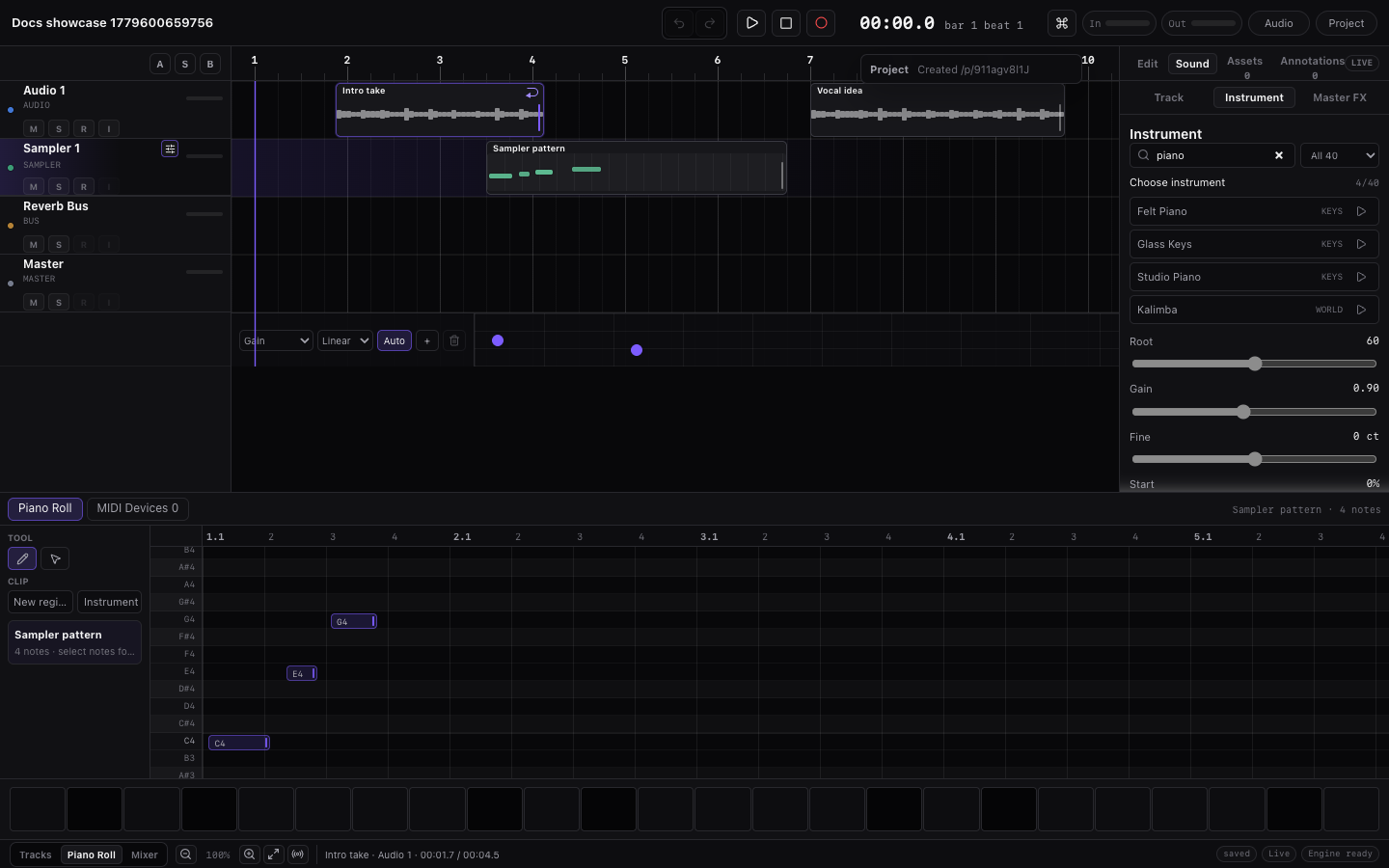
Miaou has a built-in instrument catalog for MIDI tracks. The built-in catalog is the primary way to choose playable instruments; turning an audio region into a custom instrument is secondary.
The Instrument panel opens on a compact Starter palette so the first choices are practical: drum kits, bass, piano/keys, pads, leads, plucks, and clean guitar. Switch to All or a family chip when you want the full catalog.
Pick the Right Instrument Path
Start here when you know the musical job but not which instrument workflow to use:
| Need | Use | Result |
|---|---|---|
| Play notes, chords, bass, or leads | Select a MIDI track, then load a built-in instrument from Instrument. | The track plays MIDI through the chosen instrument and saves that choice with the project. |
| Program drums or percussion | Load a full drum kit, then use named drum lanes or pads. | One MIDI track exposes Kick, Snare, Hats, Cowbell, percussion, and kit-piece lanes. |
| Trigger a riser, impact, or tape stop | Load an FX instrument such as Reverse Cymbal, Riser, Sub Hit, or Tape Stop. | One MIDI note triggers the one-shot at the intended timeline beat. |
| Turn an audio slice into an instrument | Select an audio region, then use Use in {track name} or Create instrument from region. | The selected MIDI track plays that source slice as a custom sample. |
| Import an existing MIDI file | Import MIDI first, then confirm the mapped instruments in Instrument. | Imported notes remain editable while each MIDI track uses the nearest available instrument. |
| Audition without changing the project | Click the row preview button in Instrument. | A temporary musical preview plays; the selected track is unchanged. |
Open Instrument
Select a MIDI track, then open Instrument in the right dock.
The Instrument panel includes search, Starter, All, family filters, the selected instrument name, result count, one compact row per instrument, and selected-track settings such as envelope, root note, pads, or custom sample controls.
Instrument or MIDI Tools?
These surfaces are related, but they do different jobs:
| Surface | Use it for |
|---|---|
| Instrument | Search, preview, load, and adjust the selected MIDI track's instrument, custom sample, envelope, gain, and pads. |
| MIDI Tools | Import/export .mid files, connect Web MIDI, and run selected-note transforms. |
If you want to change what a MIDI track plays, start in Instrument. If you want to bring in a MIDI file or connect a controller, use MIDI Tools.
Use Search and Filters
Instrument starts on Starter so the first screen stays useful. Search and filters change what you see, not which track will be changed.
| Control | What it does |
|---|---|
| Starter | Shows the small recommended palette for common first instruments. |
| All | Shows every bundled instrument, kit, percussion set, and transition FX instrument. |
| Family chips | Narrow the visible list to one family such as kits, keys, bass, strings, brass, woodwinds, mallets, or FX. |
| Search field | Searches the full catalog when text is present, even if empty Instrument is showing Starter. |
| Preview button | Plays a temporary musical preview without changing the selected track. |
| Instrument row body | Loads that instrument onto the selected MIDI track. This is the action that changes and saves the track setting. |
| Loaded label | Shows the instrument assigned to the selected MIDI track. |
Clear search when you want to return to the compact Starter list. Use a family chip when you want to browse a category without knowing the exact instrument name.
Choose, Preview, Load, Check
Use this short loop whenever you are changing a MIDI track's instrument:
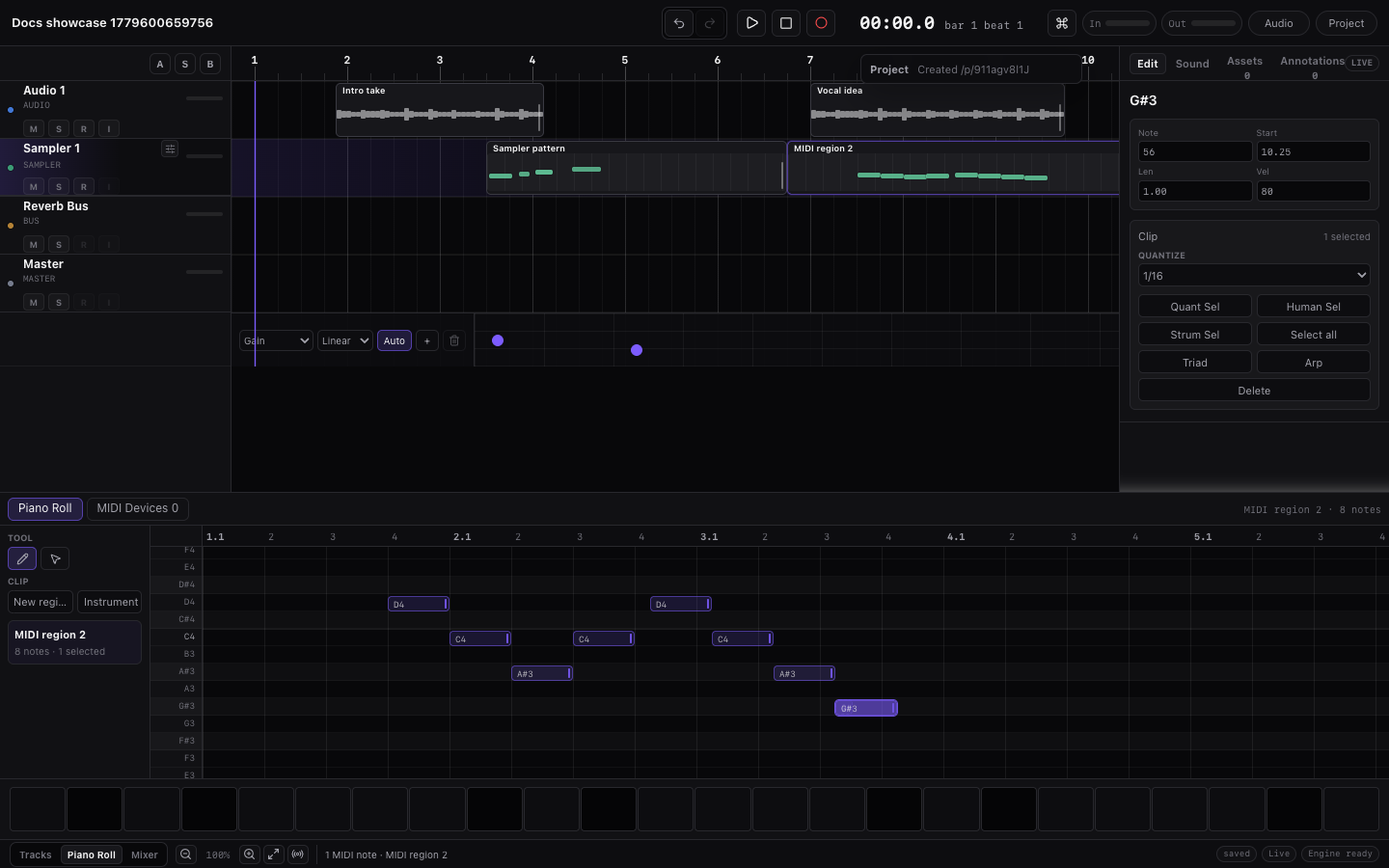
- Select the MIDI track or MIDI region you want to change.
- Open Instrument and confirm the panel names the intended target track.
- Click the preview button to audition candidates without changing the project.
- Click the instrument row body to load the instrument onto the selected MIDI track.
- Play the selected MIDI region to confirm the track now uses that instrument.
Preview and load are deliberately separate. Preview is a temporary audition. Loading changes the selected MIDI track and is saved with the project.
If you are searching for a specific family, type directly into search first. Search is global even when the empty Instrument state starts on Starter, so queries such as trumpet, marimba, riser, or kit can find full-catalog instruments without clicking All first.
What Instrument Changes Affect
Use this table when an instrument change surprises you or when you want to know whether the project was modified.
| Action | What changes | What stays the same |
|---|---|---|
| Preview an Instrument row | A temporary phrase plays through that candidate instrument. | The selected track instrument, regions, MIDI notes, effects, and routing stay unchanged. |
| Load a melodic instrument | The selected MIDI track uses that instrument for playback, recording, preview, and export. | Existing MIDI notes stay editable and keep their timing, velocity, automation, and region placement. |
| Load a drum kit | The selected MIDI track switches to kit playback and named drum lanes/pads. | MIDI notes are still normal note numbers; copied/imported drum MIDI stays compatible. |
| Load a transition FX instrument | The selected MIDI track becomes a one-shot-style MIDI trigger track. | It is still MIDI: place notes where the FX should trigger, and use audio regions for waveform edits. |
| Create instrument from audio region | The selected MIDI track uses that region's audio as a custom sample source. | The original audio region remains on the timeline and can still be trimmed, faded, looped, or moved. |
| Adjust Instrument controls | Envelope, gain, tuning, sample start/end, loop, or reverse change for the selected MIDI track source. | Other tracks and the original imported audio file are not overwritten. |
If the wrong track changed instrument, use undo immediately, select the intended MIDI track or MIDI region, then load the instrument again.
Preview an Instrument
Click the small preview button on the right side of an instrument row. Preview plays a short musical phrase and does not change the current track instrument. Drum-kit previews play a beat with multiple mapped pieces; basses play a groove; pads and keys play chord phrases; leads play a short melody.
Click the preview button again to stop, or click another preview to switch instruments.
Load an Instrument
Click the instrument name/row body. Miaou loads the instrument onto the selected MIDI track, applies the instrument envelope and tuning, and saves the selected instrument with that track if the project is unlocked.
Built-In Instrument Catalog
The catalog uses stable Miaou instrument names and IDs for projects and MIDI import. Built-in instruments are packaged as browser-ready sample zones for Miaou's sampler. Most melodic instruments use several sampled notes across their playable range, while drum and percussion kits use exact-key sample zones for named pieces.
Starter vs All
The default Starter palette is deliberately small:
| Starter instrument | Use it for |
|---|---|
| 808/909 Kit | Electronic drums, classic machine hits, cowbell. |
| Studio Drum Kit | Acoustic drum sketches and song-style patterns. |
| Finger Bass | Bass lines that need a natural attack. |
| Studio Piano | Chords, writing, and arrangement sketches. |
| FM Piano | Bright electric keys. |
| Sweep Pad | Sustained harmony and background movement. |
| Bass Lead | Simple leads, bass hooks, and mono synth lines. |
| Clean Guitar | Clean plucks and guitar-like MIDI sketches. |
Switch to All or a family chip when you want the wider catalog. Search is global: typing a query searches the full catalog even when the empty Instrument state is showing Starter.
How to Choose Instruments
| Need | Start with |
|---|---|
| Fast first beat | 808/909 Kit or Studio Drum Kit. |
| Electronic genre kit | House Kit, Techno Kit, Trap Kit, Lo-fi Kit, Breakbeat Kit, Garage Kit, or Electro Kit. |
| Acoustic or hand percussion | Cajon Kit, Hand Drum Kit, Latin Percussion Kit, Shaker & Tambourine Kit, or Wood & Bells Kit. |
| Cinematic percussion or hits | Cinematic Kit, Orchestral Percussion, Orchestral Cymbals & Gongs, Impact, or Sub Drop. |
| Writing harmony | Studio Piano, FM Piano, String Ensemble, Sweep Pad, or Warm Pad. |
| Bass line | Finger Bass, Warm Bass, Deep Sub, Picked Bass, Mean Saw Bass, or Reese Bass. |
| Lead or hook | Bass Lead, Square Lead, Saw Lead, Soft Pluck, House Pluck, or Harp Pluck. |
| Orchestral color | String Ensemble, String Spiccato, Pizzicato Strings, Brass Stabs, Air Flute, or Timpani. |
| Transition one-shot | Reverse Cymbal, Riser, Downlifter, Snare Roll, Tape Stop, or White Noise Down. |
Source and Quality Notes
The Starter palette favors safe, compact sources. 808/909 Kit, Studio Piano, Finger Bass, FM Piano, Clean Guitar, Bass Lead, and Sweep Pad use CC0 FreePats source samples. Studio Drum Kit uses the CC-BY FreePats MuldjordKit subset with attribution.
The wider catalog uses CC0 VSCO 2 Community Edition and VCSL subsets for strings, brass, woodwinds, mallets, world plucks, timpani, orchestral percussion, hand percussion, cymbals, gongs, rolls, and transition effects. A small set of lower-risk GeneralUser GS keys, bass, and synth color patches remains for extra color. Miaou-created synthesized patches cover modern synth colors, kit variations, Choir Pad, Ooh Voice, Noise Sweep, Short Riser, Long Riser, White Noise Down, Sub Hit, Tape Stop, and Sub Drop. The voice-style patches are synth pads, not sampled vocal libraries.
For source, license, and attribution details, see Instrument Sources and Licenses. For sampler boundaries, see Practical Limits.
Drum Kits and FX
Drums are kit-first in Instrument. Choose a full drum-kit instrument, then program Kick, Snare, Closed Hat, Open Hat, Clap, Cowbell, Ride, Crash, Tom, and other pieces as named MIDI lanes. Individual drum samples are kit zones/assets; they are not separate built-in instruments in the instrument catalog.
Transition FX are normal playable MIDI instruments. Load Reverse Cymbal, Snare Roll, Noise Sweep, White Noise Down, Sub Hit, Tape Stop, or another FX instrument on a MIDI track, then place a note where the one-shot should trigger.
For the full kit programming workflow, see Drum Kits and Beatmaking.
Using Built-In Instruments in Released Music
Miaou's built-in instruments are chosen so you can use them in songs, videos, shared projects, and exported mixes. Most visible instruments use CC0 sources or Miaou-created synthesized material. Studio Drum Kit uses a CC-BY source, so include the DrumGizmo credit from Instrument Sources and Licenses when you publish work that uses that kit.
User-imported samples are different: Miaou can save and play them, but the rights for those files come from wherever you got them. Check those licenses separately before releasing music or sharing stems that include them.
Use Miaou's bundled sample zones in songs, videos, shared projects, and exported mixes. They are not distributed as a standalone sample-pack product.
Built-In Instruments
| Family | Instruments |
|---|---|
| Keys | Studio Piano, Felt Piano, FM Piano, Glass Keys, Tine Keys, Clavinet, FM Keys, FM Bell, Tonewheel Organ |
| Bass | Finger Bass, Warm Bass, Deep Sub, Picked Bass, Rubber Bass, Mean Saw Bass, Reese Bass |
| Guitar and Pluck | Nylon Guitar, Muted Guitar, Clean Guitar, Overdrive Guitar, Soft Pluck, Harp Pluck, House Pluck |
| Strings and Orchestral | String Ensemble, String Spiccato, String Tremolo, Solo Violin, Cello, Pizzicato Strings, Timpani |
| Brass and Woodwinds | Brass Ensemble, Brass Stabs, Soft Horn, Trumpet, Trombone, Trombone Falls, Air Flute, Flute Staccato, Warm Clarinet, Clarinet Staccato, Tenor Sax |
| Mallets and World | Marimba, Vibraphone, Glockenspiel, Kalimba, Sitar |
| Synth | Sweep Pad, Warm Pad, Air Pad, Analog Pad, Poly Synth, Square Lead, Bass Lead, Saw Lead, Saw Stack, Super Saw |
| Voice | Choir Pad, Ooh Voice |
| Drum Kits | Studio Drum Kit, 808/909 Kit, House Kit, Techno Kit, Trap Kit, Lo-fi Kit, Breakbeat Kit, Garage Kit, Cinematic Kit, Electro Kit, Vintage Rhythm Kit, Orchestral Percussion, Latin Percussion Kit, Latin Accent Kit, Cajon Kit, Hand Drum Kit, Shaker & Tambourine Kit, Wood & Bells Kit, Orchestral Cymbals & Gongs |
| Effects | Reverse Cymbal, Riser, Impact, Downlifter, Gong Scrape, Snare Roll, Tambourine Roll, Triangle Roll, Noise Sweep, Short Riser, Long Riser, White Noise Down, Sub Hit, Reverse Snare, Cymbal Swell, Cymbal Scrape, Metal Hit, Anvil Hit, Brake Drum Hit, Bass Drum Boom, Bell Tree Sweep, Ratchet Crank, Tape Stop, Sub Drop |
Instrument Controls
After loading an instrument or custom sample, use the instrument controls for the selected MIDI track:
| Control | Meaning |
|---|---|
| Root | MIDI note that plays a custom sample at original pitch. |
| Gain | Instrument output gain. |
| Fine | Fine tuning in cents. |
| Start | Custom sample playback start position. |
| End | Custom sample playback end position. |
| Attack | Envelope attack time. |
| Decay | Envelope decay time. |
| Sustain | Envelope sustain level. |
| Release | Envelope release time. |
| Loop | Repeat a custom sample while held. |
| Reverse | Play a custom sample backward. |
The Attack, Decay, Sustain, and Release fields keep normal text-editing behavior while focused. You can select all, Backspace, type partial decimals, press Enter to commit, or press Escape to discard the typed draft.
If Instrument Feels Detached
| Symptom | What it usually means | Fix |
|---|---|---|
| Preview plays but the track is unchanged | You auditioned the instrument instead of loading it. | Click the instrument row body after previewing. |
| The wrong track changed instrument | Another MIDI track or region was the active target. | Select the intended MIDI track/region, then load the instrument again. |
| Search hides the Starter palette | A non-empty search searches the full catalog. | Clear search to return to the compact Starter list, or click a family chip. |
| Drum lanes still show pitch names | The selected track uses a melodic instrument. | Load a kit such as 808/909 Kit, Studio Drum Kit, or another drum-kit family. |
| An FX one-shot plays pitched notes | FX instruments are playable MIDI instruments, not timeline audio clips. | Place one note at the trigger time, then adjust the note start/length like MIDI. |
| Imported MIDI is silent | MIDI import created notes before a usable instrument was assigned. | Select the imported MIDI track and load a built-in instrument or drum kit. |
Drum Pads
The drum pad grid shows 16 nearby notes around the instrument root. Each pad displays a compact label and MIDI note name. Kit instruments use named lanes and pads for their mapped pieces, including Latin percussion, cajon, hand drums, shakers, tambourines, woodblocks, cowbells, cymbals, triangle, gongs, and bell accents. Press or click a pad to play. Keyboard focus supports Space and Enter for pad triggering.
When the selected instrument is a drum kit, pads and the MIDI editor use the kit map instead of treating notes as a melodic scale. The piano-roll keyboard becomes named drum lanes such as Kick, Snare, Closed Hat, Open Hat, Clap, Cowbell, Tom, Ride, Crash, and percussion. Both starter kits use exact-key sample zones for the mapped kit pieces, so clicking a named lane or pad previews that piece directly.
Computer-keyboard input is instrument-aware too. Melodic instruments can use Chromatic octave layout or Chord mode from the current Chord Track, while drum kits show a pad bank with kit-piece labels. Use this when sketching beats without a MIDI controller.
Use an Imported Audio File as a Custom Sample
Use the region-first path when possible:
- Select an audio region on the timeline.
- Select or create a MIDI track.
- Click Use in {track name} in the Region inspector, or click Create instrument from region if there is no MIDI target yet.
To use a file that is not already on the timeline, import or drag it into the timeline first, then select the new audio region and use the same Region inspector action. If there is no MIDI track, Miaou creates one.
For the broader audio-region workflow before sampling, see Audio Regions.
Miaou loads the imported audio as the selected MIDI track instrument and clears the built-in instrument ID from that track.
Custom Sample Restore
When reopening a project, Miaou tries:
- Saved project audio.
- User reimport if the original file was never saved.
If the instrument panel says reimport audio, the sample file needs to be imported again. There is no separate file-management step for users; imported and recorded audio primarily lives as regions, and reusable custom instruments are created from those regions.
Related Pages
- MIDI Editor explains Piano Roll note entry, drum lanes, pads, and computer-keyboard input.
- Drum Kits and Beatmaking explains kit choices, paint-drag hits, imported drum MIDI, and transition FX.
- Import and Export explains imported audio restore, MIDI import mapping, and MIDI export.
- Audio Regions explains audio-region trim, fade, clip gain, tempo tools, slicing, and custom sample handoff.
- Instrument Sources and Licenses explains the bundled catalog sources, licenses, attribution, and synthesized instruments.
- Practical Limits lists catalog, sampler, and kit-routing boundaries.